
This repository provides a template for setting up E2E UI test automation with UTAM (UI Test Automation Model) in Salesforce DX projects. In addition to the basic test setup configuration, a number of sample test cases are included to help you get started with UTAM. The configuration shown here was set up based on the contents of the following two repositories:
- UTAM JavaScript Recipes | Various examples of how to test the Salesforce UI with UTAM
- Salesforce E-Bikes App | LWC sample application with UTAM UI tests
To use this template, the Node version specified in the package.json and the latest version of the Salesforce CLI should already be installed.
Follow the steps below to get the template running and manually execute the sample tests already included. The sample tests should be generic enough to run in any Salesforce Org without specific configuration, such as a Trailhead Playground - in whatever language its user has set, because they address fields, actions and picklist values by their API names.
-
First clone the repository and open it with VS Code, install all the recommended extensions and run the following command to install all required dependencies:
npm install -
Next you need to authorize an org for which you want to run the tests. In VS Code this can be done by pressing Command + Shift + P, enter "sfdx", and select SFDX: Authorize an Org. Alternatively you can also run the following command from the command line:
sf org login web -
Compile all UTAM page objects:
npm run test:ui:compile -
Finally, execute all existing UI tests:
npm run test:uiEvery spec file logs in to the authorized default org with a fresh login URL from the Salesforce CLI - such a URL works only once, so each browser session gets its own. To test another org without changing your default, prefix the command:
SF_TARGET_ORG=<alias> npm run test:ui. If you need a login URL outside the tests,npm run test:ui:generate:loginwrites one to .env - it opens a session without a password, so never share or commit it.
Note: By default, the tests are executed in headless mode with the given configuration, i.e. the browser does not open visibly but runs tests in the background. This configuration is primarily intended for automatic execution in CI/CD pipelines. To deactivate the headless mode for local development and testing purposes, please comment out the following line in wdio.conf.js:
args: ['--headless=new', '--window-size=1920,1080', ...(CI ? ['--no-sandbox', '--disable-dev-shm-usage'] : [])]
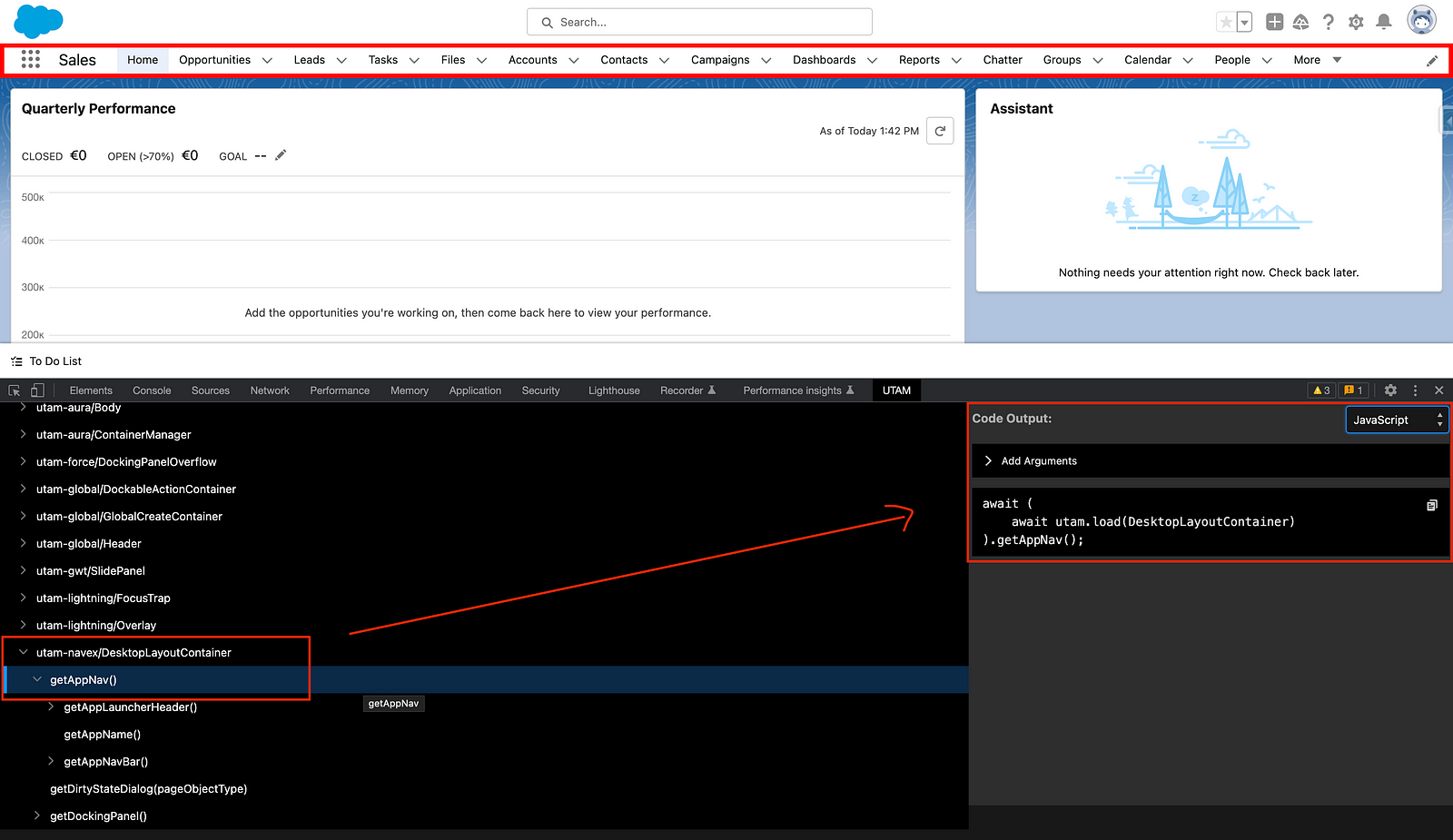
Creating UTAM tests is not trivial and the setup may involve one or two hurdles. Fortunately, there is a handy UTAM Chrome Browser Extension to help with writing the tests. This extension helps to identify the page objects of interest directly in the Salesforce org and generates the corresponding test code in the selected language:
Where the Salesforce page objects do not cover a step, write a page object of your own: a .utam.json file in a __utam__ folder - next to the Lightning web component it describes, or in force-app/test/utam/__utam__ for test-only page objects such as recordModal.utam.json in this repository. npm run test:ui:compile compiles them into pageObjects/, from where the specs import them.
For AI coding agents, svierk/salesforce-skills packages the know-how of this template as an agent skill: the 🧪 E2E Automator brings this setup into an existing Salesforce DX project, turns stories and tickets into UTAM UI tests, writes page objects for custom components, and fixes and upgrades the test suite with every Salesforce release.
UTAM tests can also be executed automatically in headless mode within a pipeline. The following Medium article describes how to an automated UTAM test execution in detail:
Automate Salesforce E2E Testing using UTAM & GitHub Actions
Below is an example with GitHub Actions, which is also used in this repository and can be found in the .github directory:
# least-privilege token: the workflow only reads the repository
permissions:
  contents: read

jobs:
  tests:
    name: E2E UI Tests
    runs-on: ubuntu-latest
    steps:
      - name: Checkout
        uses: actions/checkout@v7.0.1
        with:
          persist-credentials: false # the GITHUB_TOKEN is not needed after the checkout
      - name: Select Node Version
        uses: svierk/get-node-version@v1.5.1
      - name: Install Dependencies
        run: npm ci
      - name: Install SF CLI
        uses: svierk/sfdx-cli-setup@v1.1.2
      - name: Salesforce Org Login
        uses: svierk/sfdx-login@v1.4.2
        with:
          client-id: ${{ secrets.SFDX_CONSUMER_KEY }}
          jwt-secret-key: ${{ secrets.SFDX_JWT_SECRET_KEY }}
          username: ${{ vars.SFDX_USERNAME }}
      - name: Compile UTAM Page Objects
        run: npm run test:ui:compile
      - name: UTAM E2E Tests
        run: npm run test:ui
A few conventions worth copying along with the snippet:
- Pin every action to an exact release tag (
@v7.0.1, not@mainor@v7). A floating branch or major-version tag silently changes what runs in your pipeline; an exact tag makes every update a reviewable commit. Dependabot keeps the pins current - see .github/dependabot.yml for thegithub-actionsecosystem configuration used here. - Keep the org username in a repository variable, not a secret. Only the connected app's consumer key (
SFDX_CONSUMER_KEY) and the JWT private key (SFDX_JWT_SECRET_KEY) are confidential;vars.SFDX_USERNAMEdocuments itself in the run log and keeps the secret list to what actually needs masking. - Never interpolate a secret into a
run:script. Pass it as an action input as shown above, or expose it throughenv:- inlining${{ secrets.* }}into a shell command puts it into the command line and, with the wrong quoting, into the log. - Grant the workflow only
contents: readand add further permissions per job, where they are needed. - Guard secret-dependent jobs against fork pull requests. Those runs get no secrets by design, so an org login would fail for reasons unrelated to the change. In this repository the E2E job carries
if: github.event_name != 'pull_request' || github.event.pull_request.head.repo.full_name == github.repository.
A red E2E run raises one question first: is the test broken, the application, or the environment? Answering it means reading a long WebdriverIO log, the error and the page the test stopped on - routine work an AI agent can take over. This repository does it with GitHub Agentic Workflows: .github/workflows/e2e-failure-analyst.md describes the task in natural language, and gh aw compile turns it into the GitHub Actions workflow e2e-failure-analyst.lock.yml next to it.
Whenever the Validation workflow fails, the analyst:
- collects the evidence of the run - the logs of the failed jobs, the JUnit results and the screenshot of every failed test, which wdio.conf.js writes to reports/ and the CI uploads as the
e2e-reportsartifact - reads it together with the code at the tested commit, using the 🧪 E2E Automator skill to check what the installed Salesforce page objects offer
- classifies the failure as a test defect (with the concrete fix), an application defect (with the question for whoever knows the expected behaviour), an environment problem (login, org, browser) or unclear
- reports it as a comment on the pull request of the run, or - for runs on
main- in an issue labellede2e-failure, adding to an open issue when the same failure occurs again
The agent analyses and recommends; it changes no code, and the team decides. Failures of the Code Quality job are left alone.
Security model. The org credentials never reach the agent: the E2E tests keep running in the ordinary CI job, and the analyst only reads what that job left behind. The agent runs in a sandbox behind the Agent Workflow Firewall with read-only repository access and no secrets - the Anthropic API key stays in a proxy outside it. Its only way to write is the declared safe outputs (one comment or one issue per run), and a threat detection job checks them before they are applied. The login URL of the test user opens a session without a password, so wdio.conf.js redacts it from the JUnit results, and the analyst redacts it from the logs before reading them.
Setup.
- Install the CLI:
gh extension install github/gh-aw - Store an Anthropic API key as repository secret:
gh aw secrets set ANTHROPIC_API_KEY --value "<key>" - Adjust
branchesin the trigger of e2e-failure-analyst.md to your branch naming, and rungh aw compileafter every change to the file - commit both the .md and the .lock.yml. - Try it on a past failure before relying on it:
gh aw run e2e-failure-analyst --raw-field run_id=<id of a failed run>. Withstaged: trueundersafe-outputs:the run shows what it would post without posting it.
gh aw logs e2e-failure-analyst shows tokens, AI credits and turns per run, and gh aw forecast projects the monthly cost from them. To report to Jira or Xray instead of GitHub, gh-aw offers Jira safe outputs such as jira-add-comment.
- UTAM Developer Guide | Official UTAM documentation on Salesforce Developers
- Run End-to-End Tests with the UI Test Automation Model (UTAM) | Post in Salesforce Developers' Blog
- Streamline E2E Testing with UTAM: Salesforce's UI Test Automation Model | Medium post
- Automate Salesforce E2E Testing using UTAM & GitHub Actions | Medium post
- From a Jira Ticket to a Running Salesforce UI Test Written by an AI | Medium post
- Run End-to-End Tests With UTAM | YouTube video, 15min UTAM overview
- Getting Started with UTAM | YouTube video, 1h step by step guide for writing a UTAM test
- Streamline Salesforce E2E UI Testing with UTAM | Apex Hours session, August 2025 (slides)
- Automate UI Testing with AI and UTAM | Apex Hours session, August 2026 (slides)