
ModeVue — is a carefully crafted, multi-purpose, responsive, and gorgeous website theme. Originally built on Nuxt 2 and Vuetify 2, it has been completely modernized to run on Nuxt 4, Vuetify v4, and Vue 3 with native TypeScript support using the Composition API (<script setup lang="ts">).
The theme is based on the Material Design Specification. It uses Vuetify as the front-end UI framework and leverages tree-shaking for optimized production bundles.
- Nuxt v4 Upgrade: Fully migrated to Nuxt 4 with a clean target compatibility layout. The application source code has been consolidated into the standard
app/folder. - Vuetify v4 Migration: Replaced Vuetify 2 components, icons, theme configurations, and grid utilities with modern Vuetify v4 features.
- Vue 3 Composition API: Rewrote layouts, pages, and components using the type-safe
<script setup lang="ts">style. - TypeScript Native: Integrated strict type checking with a customized
tsconfig.json. - Performance & Security: Wiped out outdated packages (like
node-sass,fibers, and Webpack loaders) and migrated to Vite compilation. Vulnerability count is reduced to 0. - Static Assets: Moved all assets from
static/to thepublic/directory, serving them cleanly at the root URL.
To build and run this application locally, you will need:
- Node.js v18.0.0+ (v20+ or v22+ recommended)
- NPM v9.0.0+ or Yarn
# 1. Install dependencies
$ npm install

# 2. Serve with hot reload at localhost:3000
$ npm run dev

# 3. Build for production
$ npm run build

# 4. Preview the production build locally
$ npm run preview

# 5. Generate a static site output
$ npm run generateIf Node.js is not installed natively on your host machine, you can build and run the development or production builds using standard Docker containers:
To spin up a development container running Node 22:
docker run -d --name modevue-app-dev -p 3000:3000 -v "${PWD}:/app" -w /app node:22-alpine sh -c "npm install && npm run dev -- --host 0.0.0.0"Once initialized, the development site will be accessible at http://localhost:3000.
To compile the production bundles inside a Docker container:
docker run --rm -v "${PWD}:/app" -w /app node:22-alpine npm run build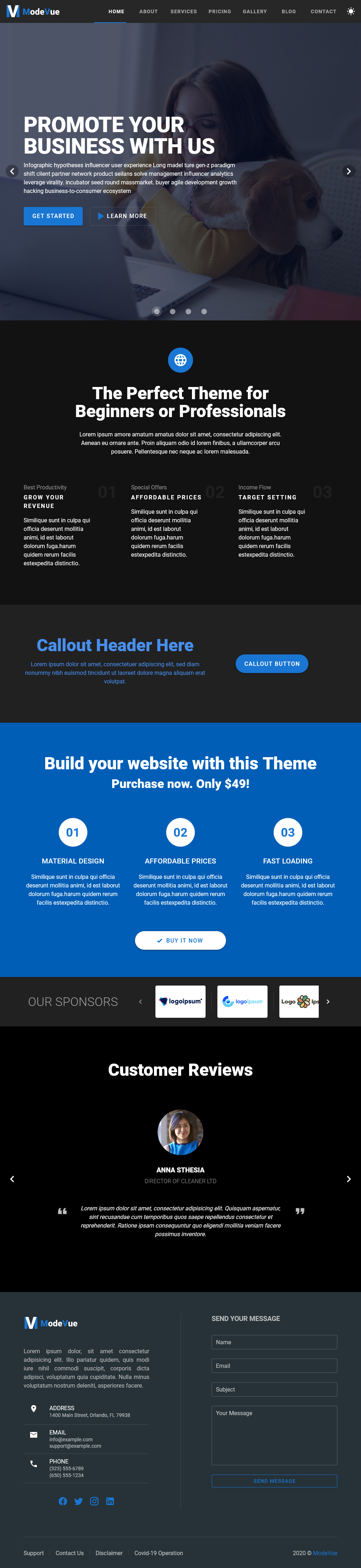
- Professionally Developed: All components and layout architectures are implemented following current Vue 3 and Nuxt best practices.
- Blazing Fast & Optimized: Treeshaking is enabled natively to bundle only the Vuetify components you actually use.
- SEO Ready: Standard semantic structures with per-page meta tag definitions.
We support the last two versions of all major browsers:



- Copyright 2020-2026 Vuetify, LLC https://vuetifyjs.com
- Vuetify, LLC License Information
- Beautiful layout with 8 pre-built page examples (Home, About, Services, Pricing, Gallery, Blog, Contact, 404).
- Dark Mode toggle supported natively via Vuetify's
useTheme()composable. - Responsive design down to
320pxwidth. - Optimized for search engine indexation (SEO) and accessibility (ARIA).
- Easy customization of Vuetify components.
Still have questions about this theme? Reach out to us by email.