

A fast, keyboard-driven workspace overview for Hyprland.
Live window thumbnails, type-to-filter, and app icons — no compositor plugin required.


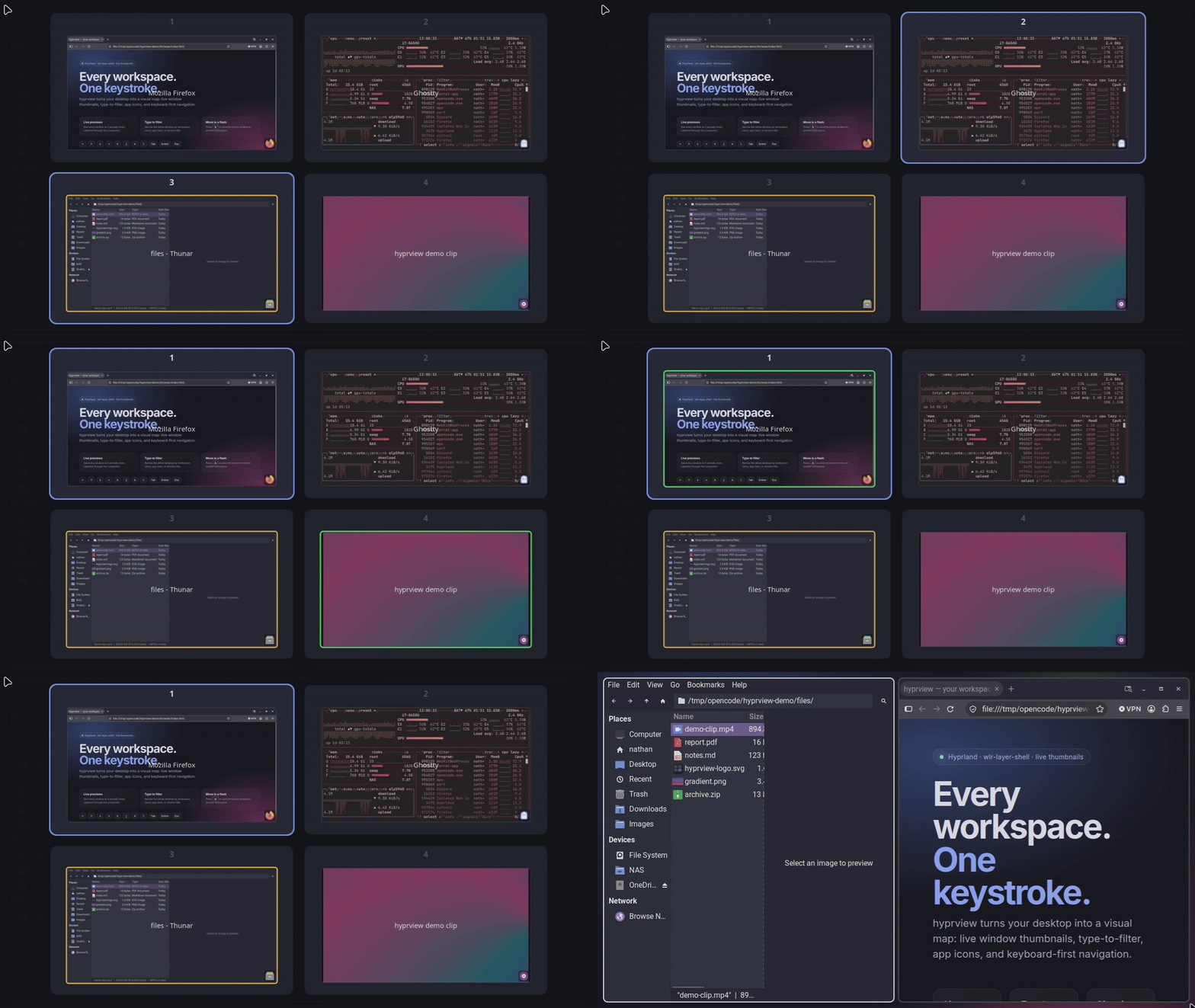
hyprview runs as a small background daemon. On demand it puts up a fullscreen overlay showing every workspace with real window thumbnails, then lets you navigate, filter, focus, and move windows — all from the keyboard or, if you opt in, the mouse.
- Live window thumbnails via
hyprland-toplevel-export-v1(Hyprland only) - Workspace grid with named/numbered labels and windows that wrap to fill each card
- Keyboard-first navigation with arrows or
hjkl, plus1–9for direct card jumps - Tab / Shift+Tab window cycling across all workspaces, starting from the focused window
- Type-to-filter across workspace names, window classes, and titles, with non-matches dimmed
- Enter to act on the Tab-highlighted window, the single filter match, or the selected workspace
- Move windows with
m— send the active window to the selected workspace - Close windows with
Delete, targeting the hovered window or single filter match - App icons on thumbnails, resolved from the icon theme and
.desktopfiles - Hover tooltip with the app icon, name, class, and window title
- Optional mouse support — hover to select, left-click to focus/switch, Shift+left-click to move, right-click to close
- Config hot reload when the config file changes (or on
SIGHUP) - Daemon lifetime with a single-instance lock and near-zero CPU while hidden
- No process spawning — workspace/window operations go straight over the compositor's IPC socket
- Linux with a Wayland compositor that supports
wlr-layer-shell - Hyprland 0.55+ for the full feature set, including live thumbnails
- Sway works with reduced functionality: there are no live thumbnails, so
windows are drawn as coloured placeholders with their app id (the same
fallback as
--no-preview) - No GTK, Qt, or other toolkit at runtime
Each GitHub release includes a prebuilt x86_64 binary and a stable source tarball. The binary is dynamically linked against Wayland, Cairo, and Pango, so those runtime libraries must be installed.
curl -LO https://github.com/nnthnn/hyprview/releases/latest/download/hyprview-x86_64-unknown-linux-gnu.tar.gz
curl -LO https://github.com/nnthnn/hyprview/releases/latest/download/hyprview-x86_64-unknown-linux-gnu.tar.gz.sha256
sha256sum -c hyprview-x86_64-unknown-linux-gnu.tar.gz.sha256
tar xzf hyprview-x86_64-unknown-linux-gnu.tar.gz
sudo install -Dm755 hyprview/hyprview /usr/local/bin/hyprview
With a Rust toolchain installed:
cargo install --git https://github.com/nnthnn/hyprview --locked
AUR publishing is paused while Arch restricts new accounts and package pushes,
so build the tracked hyprview-git package locally:
git clone https://github.com/nnthnn/hyprview.git
cd hyprview/packaging/aur/hyprview-git
makepkg -si
Build dependencies: a Rust toolchain, pkg-config, and the Wayland, Cairo, and
Pango development headers.
# Arch
sudo pacman -S --needed base-devel rust wayland pango

# Debian / Ubuntu
sudo apt install cargo pkg-config libwayland-dev libpango1.0-dev
Then:
git clone https://github.com/nnthnn/hyprview.git
cd hyprview
cargo build --release
The binary is at target/release/hyprview.
Install it system-wide:
sudo install -Dm755 target/release/hyprview /usr/local/bin/hyprview
Or user-local (make sure ~/.local/bin is on your PATH):
install -Dm755 target/release/hyprview ~/.local/bin/hyprview
Start the daemon in the background:
hyprview &
Toggle the overlay from anywhere:
hyprview --toggle
# equivalent:
pkill -SIGUSR1 hyprview
Force a config reload:
pkill -SIGHUP hyprview
hyprview --toggle uses a PID lock file in $XDG_RUNTIME_DIR, so it can find
the running daemon without a process lookup. Starting a second hyprview
instance is a no-op — the existing instance keeps running.
To open the overlay immediately when the daemon starts, set
show_on_startup = true in the [behavior] section of the config. This is
handy when binding hyprview directly to an overview key instead of running it
as an autostart daemon.
Hyprland 0.55+ reads ~/.config/hypr/hyprland.lua. If you have migrated to the
Lua config, add the daemon to your startup and bind a key to the toggle:
-- ~/.config/hypr/hyprland.lua
hl.on("hyprland.start", function()
    hl.exec_cmd("hyprview")
end)

hl.bind("SUPER + Tab", hl.dsp.exec_cmd("hyprview --toggle"))
Replace SUPER with your mainMod if you use a different modifier. If
hyprview is installed somewhere Hyprland does not see on PATH (for example
~/.local/bin), use the full path in hl.exec_cmd. Hyprland loads
hyprland.lua in preference to a legacy hyprland.conf, so the old
exec-once/bind syntax will not take effect while a Lua config exists.
Sway is auto-detected via SWAYSOCK/I3SOCK and runs in fallback mode without
live thumbnails:
# ~/.config/sway/config
exec hyprview
bindsym $mod+Tab exec hyprview --toggle
| Flag | Description |
|---|---|
--toggle |
Send SIGUSR1 to the running daemon and exit |
--no-preview |
Skip thumbnails and draw coloured placeholder rectangles |
--allow-mouse |
Enable mouse hover, click, and right-click support |
-h, --help |
Print usage and exit |
-V, --version |
Print the version and exit |
CLI output is colourised when the matching stream is a terminal. Set
NO_COLOR to any non-empty value to disable colour, for example when capturing
logs.
--version prints just the release number for a build made from the matching
vX.Y.Z tag. Local and in-between builds append the short commit id, for
example hyprview 0.2.0 (a5a668f); uncommitted changes add -dirty.
Flags can be combined, for example:
hyprview --no-preview --allow-mouse &
| Input | Action |
|---|---|
Arrow keys / hjkl |
Navigate the workspace grid |
| Tab / Shift+Tab | Cycle the window highlight across all workspaces (starts from the focused window) |
| Enter | Focus the highlighted window, the single filter match, or switch to the selected workspace |
1–9 |
Jump to the 1st–9th workspace card in the grid |
| Type | Filter workspaces, window classes, and titles |
| Backspace | Delete the last filter character |
m |
Move the active window to the selected workspace (when not filtering) |
| Delete | Close the hovered window, or the single filter match |
| Escape | Clear the Tab highlight, then the filter, then close the overlay |
Mouse (with --allow-mouse) |
Hover to select and show the tooltip; left-click a window to focus it, a card to switch workspace, or outside to close; Shift+left-click to move the active window to the hovered workspace; right-click a window to close it |
hjkl navigation is disabled while a filter is active; the arrow keys always
work. Number keys only jump when the filter is empty.
hyprview reads $XDG_CONFIG_HOME/hyprview/config.toml, falling back to
~/.config/hyprview/config.toml. Every key is optional. On first run the file
is seeded from the bundled
config.example.toml;
an existing pre-rename ~/.config/hyprexpose/config.toml is migrated
automatically.
The file is watched for changes and reloaded live. You can also send SIGHUP
to force a reload. Unknown sections and keys are reported on stderr so typos
don't silently fall back to defaults.
See
docs/configuration.md
for the full reference, or
config.example.toml
for the annotated file.
Bug reports and pull requests are welcome. See
CONTRIBUTING.md
for the short version, and
docs/development.md
for architecture notes, build and test commands, packaging, and the release
process. Release notes are generated on the
GitHub releases page.
MIT — see LICENSE.
hyprview began as a fork of hyprexpose by ThiagoAVicente. It has since diverged into its own project, adding type-to-filter, Tab cycling, app icons and tooltips, window closing, config hot reload, packaged releases, and this documentation and site.