
See LICENSE.MD before using, modifying, or redistributing this plugin.


QuestsPlus combines randomly generated daily quests, shared global quests, progression systems, and flexible reset options in one plugin. It is designed for servers that want repeatable content, long-term player goals, and configurable reward loops without forcing players through the same fixed quest path every day.
- Randomly generated daily quests from your configured quest pools
- Permission-based rerolls and Premium Quest slots
- Quest Reset purchases with PlayerPoints, Vault, or custom currencies
- Weekly global quests with percentile-based rewards
- Streaks, milestones, shields, and recovery systems
- Built-in survival quest types with SDK support for custom expansion
- PlayerPoints - points-based quest resets
- Vault - economy-based quest resets
- RoseStacker - stacked mob kill quest support
Daily quests are randomly generated from your defined configuration files. Each generated quest pulls from your configured quest definitions, values, and goals, which can include items, blocks, mobs, and more.
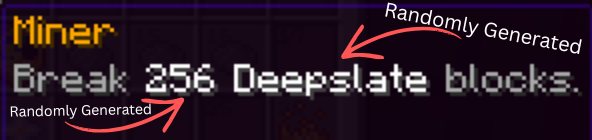
Randomly Generated Quests
All quests are randomly generated from the defined configuration files. The algorithm gets a random defined quest, a random number from the defined quest, and a random "goal" from the defined quest, which could be an item, block, mob, etc.
Daily Quest Rerolls
Set up permission based reroll amounts, in case the player does not like their quest, they can choose to reroll.
# Permission-based daily reroll limits.
rerolls:
  # Maps each key to permission questsplus.reroll.<key>; the highest matching value is used.
  permission-limits:
    vip: 1
    vipplus: 2
    mvp: 3
Premium Quests
You can set up permission based additional slots that are additive from the base amount that are considered Premium Quests which adds bonus rewards that you define in the configurations.
# Maps each key to permission questsplus.premium.<key>; the highest matching value is used.
permission-limits:
  vip: 1
  vipplus: 2
  mvp: 3

# Premium bonus rewards keyed by quest difficulty id. These run after difficulty rewards and before quest-specific rewards.
rewards:
  easy:
    commands:
    - eco give <player> 125
    - eco give <player> 500
Quest Reset Purchases
Players can purchase a Quest Reset after completing every quest slot they currently have access to. A reset clears the current generated quests for that reset window, but keeps lifetime completions, milestones, streaks, shields, recoveries, and reroll usage.
Supported reset currencies:
- PlayerPoints through
currencies.yml - Vault through
currencies.yml - Custom currencies registered through the QuestsPlus SDK
enabled-currencies:
- playerpoints
- vault

playerpoints:
  display-name: Player Points
  quest-reset-cost: 250

vault:
  display-name: Money
  quest-reset-cost: 5000.0
Global quests are weekly server-wide goals where one quest is generated for the active period and every matching player action contributes to the same shared target.
Global Quests Details
Global quests are weekly server-wide goals. One global quest is generated for the active period, and all matching player actions contribute toward the same shared goal.
Each player contribution is tracked separately, allowing percentile-based rewards at the end of the global quest period.
schedule:
  day-of-week: FRIDAY
  time: "05:00"

reduced-reward-minimum-percent: 50.0

reward-tiers:
- percentile: 1.0
  display-name: <gold>Top 1%
  commands:
  - eco give <player> 10000

reduced-reward-tiers:
- percentile: 25.0
  display-name: <yellow>Top 25%
  commands:
- eco give <player> 1000/qa global add <quest-type> <amount> <player>
/qa global refreshQuestsPlus includes multiple ways to keep players progressing over time, from visible quest progress indicators to streaks and automatic milestone rewards.
Quest Indicators
Quest indicators can show progress updates through boss bars, action bars, or chat summaries.
Players can choose how personal and global progress is displayed.
/quests indicator <main|global|both> <type|off|default>Streaks
QuestsPlus can track streaks based on the configured reset window. You can require all selected quests, or a fixed amount of completed quests, before a player earns streak progress.
Streak Shields can automatically protect a streak from being broken. Streak Recovery can restore a recently lost streak from the streak menu.
daily-required-completions: -1
recovery-window-days: 3
milestones:
- streak: 7
display-name: <gold>One Week Streak
rewards:
commands:
- eco give <player> 2500/qa shield give <amount> <player>
/qa shield take <amount> <player>
/qa recovery give <amount> <player>
/qa recovery take <amount> <player>Milestones
Reward players for lifetime quest completions per difficulty. Milestones are claimed automatically, so players do not need to click a reward button.
milestones:
- completed: 10
display-name: <green>Easy Starter
rewards:
commands:
- eco give <player> 1000
- completed: 25
display-name: <green>Easy Regular
rewards:
commands:
- give <player> diamond 3QuestsPlus includes common survival quest types across combat, gathering, farming, crafting, exploration, and trading.
View Included Quest Types
QuestsPlus includes common survival quest types such as:
- Kill mobs
- Kill mobs in a specific world
- Break blocks
- Place blocks
- Harvest crops
- Craft items
- Smelt items
- Brew items
- Fish
- Enchant items
- Shear sheep
- Dye sheep
- Milk mobs
- Eat cake slices
- Throw items
- Trade with villagers
- Travel distance
Use this command in-game to view the exact registered quest type keys:
/qa listtypesPlayers can track progress, milestones, streaks, and indicators through player commands, while admins can manage reloads, resets, completions, rerolls, and global quest progress.
Player and Admin Commands
/quests
/q
/quests progress
/quests completed
/quests milestones
/quests milestones <difficulty>
/quests streaks
/quests indicator <main|global|both> <type|off|default>/questsadmin
/qa
/qa reload
/qa listtypes
/qa reset <player>
/qa complete <player>
/qa dailyrerolls reset <player>
/qa add <amount> <quest-type> <player>
/qa global add <quest-type> <amount> <player>
/qa global refreshQuestsPlus supports SQLite out of the box, as well as MySQL, MariaDB, and PostgreSQL for servers that want an external database.
Database Support
QuestsPlus supports:
- SQLite - default database, no setup required
- MySQL
- MariaDB
- PostgreSQL
QuestsPlus includes an SDK for external plugins that want to register custom quest types or custom Quest Reset currencies.
SDK Setup
Use compileOnly so your plugin compiles against the QuestsPlus API without shading the SDK into your plugin jar.
repositories {
    maven("https://repo.moonrise.gg/repository/maven-releases/")
    maven("https://repo.moonrise.gg/repository/maven-snapshots/")
}

dependencies {
    compileOnly("gg.moonrise.quests:quests-sdk:0.1")
}<repositories>
<repository>
<id>moonrise-releases</id>
<url>https://repo.moonrise.gg/repository/maven-releases/</url>
</repository>
<repository>
<id>moonrise-snapshots</id>
<url>https://repo.moonrise.gg/repository/maven-snapshots/</url>
</repository>
</repositories>
<dependencies>
<dependency>
<groupId>gg.moonrise.quests</groupId>
<artifactId>quests-sdk</artifactId>
<version>0.1</version>
<scope>provided</scope>
</dependency>
</dependencies>Plugin Metadata
Add QuestsPlus to your plugin metadata so Bukkit or Paper loads QuestsPlus before your external integration.
depend:
- QuestsPlus
If your integration is optional, use softdepend instead and handle a missing QuestApi at runtime.
softdepend:
- QuestsPlusdependencies:
server:
QuestsPlus:
load: BEFORE
required: trueFor an optional integration, set required: false and keep the same runtime null check shown below.
Getting QuestApi
QuestsPlus registers QuestApi through Bukkit services after QuestsPlus enables. Load it in your plugin after dependencies are available:
import gg.moonrise.quests.sdk.QuestApi;
import org.bukkit.Bukkit;
import org.bukkit.plugin.java.JavaPlugin;

public final class MyPlugin extends JavaPlugin {
    private QuestApi questApi;

    @Override
    public void onEnable() {
        this.questApi = Bukkit.getServicesManager().load(QuestApi.class);
        if (this.questApi == null) {
            getLogger().warning("QuestsPlus is not available; quest integration disabled.");
            return;
        }

        // Register custom quest handlers, variable selectors, or currencies here.
    }

    @Override
    public void onDisable() {
        if (this.questApi != null) {
            this.questApi.unregisterAll(this);
        }
    }
}
Bukkit Event Quest Example
External quest types can progress through the same completion, reward, milestone, streak, and global quest pipeline as built-in quests.
This example creates an EAT_CUSTOM_ITEM quest type backed by Bukkit's PlayerItemConsumeEvent.
# difficulty/easy/quests.yml
quest-definitions:
- id: eat-custom-item
  type: EAT_CUSTOM_ITEM
  enabled: true
  display-name: "<green>Snack Break"
  description:
  - "<gray>Eat <white><goal-amount></white> <white><item-type></white>."
  variables:
    item-type:
      selector: LIST
      values:
      - GOLDEN_APPLE
      - COOKED_BEEF
    goal-amount:
      selector: LIST
      values:
      - 3
      - 5
  rewards:
    commands:
- "eco give <player> 250"import gg.moonrise.quests.sdk.GoalHandler;
import gg.moonrise.quests.sdk.QuestApi;
import gg.moonrise.quests.sdk.model.GeneratedQuest;
import gg.moonrise.quests.sdk.model.QuestDefinition;
import gg.moonrise.quests.sdk.model.QuestType;
import org.bukkit.event.EventHandler;
import org.bukkit.event.player.PlayerItemConsumeEvent;
import java.util.Map;
import java.util.UUID;
public final class EatCustomItemGoalHandler implements GoalHandler {
private static final QuestType TYPE = QuestType.of("EAT_CUSTOM_ITEM");
private final QuestApi api;
public EatCustomItemGoalHandler(QuestApi api) {
this.api = api;
}
@Override
public QuestType type() {
return TYPE;
}
@Override
public void validateDefinition(QuestDefinition definition) {
if (!definition.selectorTypes().containsKey("item-type")) {
throw new IllegalArgumentException("EAT_CUSTOM_ITEM requires item-type");
}
if (!definition.selectorTypes().containsKey("goal-amount")) {
throw new IllegalArgumentException("EAT_CUSTOM_ITEM requires goal-amount");
}
}
@Override
public GeneratedQuest createGeneratedQuest(QuestDefinition definition, UUID playerId, String resetKey, Map<String, String> variables) {
int goalAmount = Integer.parseInt(variables.get("goal-amount"));
return new GeneratedQuest(
UUID.randomUUID(),
playerId,
resetKey,
definition.id(),
definition.type(),
definition.difficultyId(),
definition.difficultyDisplayName(),
definition.displayName(),
definition.description(),
variables,
goalAmount,
0,
false
);
}
@EventHandler(ignoreCancelled = true)
public void onConsume(PlayerItemConsumeEvent event) {
String material = event.getItem().getType().name();
api.progressMatching(
event.getPlayer(),
TYPE,
1,
quest -> material.equals(quest.variables().get("item-type"))
);
}
}Register the handler after loading QuestApi:
questApi.registerGoalHandler(this, new EatCustomItemGoalHandler(questApi));registerGoalHandler also registers the handler as a Bukkit listener. Call questApi.unregisterAll(this) during plugin disable if your plugin can disable while the server is running.
Quest Progress Event Example
External plugins can listen to QuestProgressEvent to cancel or adjust progress before QuestsPlus updates cache, saves progress, runs rewards, evaluates streaks and milestones, or records global contribution.
import gg.moonrise.quests.sdk.event.QuestProgressEvent;
import gg.moonrise.quests.sdk.model.QuestType;
import org.bukkit.event.EventHandler;
import org.bukkit.event.Listener;

public final class QuestProgressListener implements Listener {
    private static final QuestType EAT_CUSTOM_ITEM = QuestType.of("EAT_CUSTOM_ITEM");

    @EventHandler(ignoreCancelled = true)
    public void onQuestProgress(QuestProgressEvent event) {
        if (event.quest().type().equals(EAT_CUSTOM_ITEM)
                && event.cause() == QuestProgressEvent.Cause.API) {
            event.setAmount(Math.min(event.getAmount(), 1));
        }

        if (event.quest().definitionId().equals("blocked_quest")) {
            event.setCancelled(true);
        }
    }
}
QuestProgressEvent.Cause.EVENT is used for built-in Bukkit listener progress, API is used for QuestApi#progressMatching, and COMMAND is used for QuestsPlus admin command progress.
Custom Currencies
Custom currencies can be registered for Quest Reset purchases, allowing servers to charge custom points, tokens, or other plugin-managed balances. QuestsPlus owns the reset limit, reset menu, and quest reset transaction. The external plugin owns the balance lookup, availability check, display text, menu button details, and charge operation.
Implement QuestCurrency:
import gg.moonrise.quests.sdk.currency.QuestCurrency;
import gg.moonrise.quests.sdk.currency.QuestCurrencyButton;
import gg.moonrise.quests.sdk.currency.QuestCurrencyKey;
import org.bukkit.entity.Player;

import java.util.List;

public final class TokenCurrency implements QuestCurrency {
    private final TokenService tokenService;
    private final QuestCurrencyKey key = QuestCurrencyKey.of("tokens");

    public TokenCurrency(TokenService tokenService) {
        this.tokenService = tokenService;
    }

    @Override
    public QuestCurrencyKey key() {
        return key;
    }

    @Override
    public String displayName() {
        return "Tokens";
    }

    @Override
    public String displayAmount(Player player) {
        return String.valueOf((int) questResetCost());
    }

    @Override
    public double questResetCost() {
        return 5.0D;
    }

    @Override
    public QuestCurrencyButton button() {
        return QuestCurrencyButton.of(
                13,
                "SUNFLOWER",
                "<gold>Tokens",
                List.of(
                        "<gray>Spend <yellow><amount> <payment></yellow><gray> to reset quests.",
                        "<gray>Resets remaining today: <white><resets_remaining></white>"
                )
        );
    }

    @Override
    public boolean isAvailable() {
        return tokenService != null;
    }

    @Override
    public boolean charge(Player player, double amount) {
        return tokenService.take(player.getUniqueId(), amount);
    }
}
Register the currency after loading QuestApi:
TokenService tokenService = getTokenService();
questApi.registerCurrency(this, new TokenCurrency(tokenService));
Clean up registrations when your plugin disables:
@Override
public void onDisable() {
    if (this.questApi != null) {
        this.questApi.unregisterAll(this);
    }
}
QuestsPlus only completes the Quest Reset purchase when charge(player, amount) returns true. Return false when the player cannot afford the purchase or the backing transaction fails. isAvailable() should return false when the backing economy, token service, or database connection is not ready; unavailable currencies are not usable for purchases.
Currency keys should be stable lowercase identifiers such as tokens, gems, or guild_points. Built-in currency keys are exposed through QuestCurrencies, and custom keys should be created with QuestCurrencyKey.of("your-key").
This README is the server-owner overview. For exhaustive examples, placeholder tables, quest-type variable requirements, and GUI layout details, read wiki/questsplus.md.