Repository navigation
Create3 _Lidar failure #55
Description

Hi, after following the instructions in here
using a nomachine on a Jetson nano. I've opened the four .py files in the same terminator:

and got:

note: the "[async_slam_toolbox_node-1] Registering sensor: [Custom Described Lidar]" doesn't appear but the "teleop_twist_keyboard" does work. in rvis2 I got

the NTP tip in here didn't solve it
Are the errors in rviz and the slam_toolbox related? how can i solve them?
Activity
carlsondc-ceva commentedon May 28, 2024
I would start by verifying that all of your sensors are running and data is getting to the right places.
The first diagnostic steps I'd follow (when all of your scripts are running):
ros2 node list: verify that all of the nodes you need are actually running. There should be a number of nodes that are part of the Create 3 platform, your lidar node, theslam_toolboxnode, and the teleop node at a minimum.rqt_graph: this will show you where messages are flowing between nodesros2 run tf2_tools view_frames: this will show you how the various coordinate frames relate to each other.In RViz, you can change your "fixed frame" from "map" to "base_link" and you should see a visualization of the LIDAR scans.
Let us know what the output of those steps yields.
mynameissagif commentedon May 29, 2024
thanks for the reply!
this time the slam_toolobox responded
discarding message because the queue is fullin a loopI got:
root@jetson-desktop:/# ros2 node list /rplidar_node /rviz /slam_toolbox /static_transform_publisher_kVe59C68GM53Vme7 /teleop_twist_keyboard /transform_listener_impl_5587ff4220 /transform_listener_impl_55908f2430root@jetson-desktop:/# ros2 run tf2_tools view_frames [INFO] [1716998423.902067270] [view_frames]: Listening to tf data for 5.0 seconds... [INFO] [1716998428.905291018] [view_frames]: Generating graph in frames.pdf file... [INFO] [1716998428.914231800] [view_frames]: Result:tf2_msgs.srv.FrameGraph_Response(frame_yaml="odom: \n parent: 'map'\n broadcaster: 'default_authority'\n rate: 2520000.000\n most_recent_transform: 0.200000\n oldest_transform: 0.200000\n buffer_length: 0.000\nlaser_frame: \n parent: 'base_footprint'\n broadcaster: 'default_authority'\n rate: 10000.000\n most_recent_transform: 0.000000\n oldest_transform: 0.000000\n buffer_length: 0.000\nbase_footprint: \n parent: 'odom'\n broadcaster: 'default_authority'\n rate: 20.364\n most_recent_transform: 1635448750.453409\n oldest_transform: 1635448747.605192\n buffer_length: 2.848\nbase_link: \n parent: 'odom'\n broadcaster: 'default_authority'\n rate: 20.364\n most_recent_transform: 1635448750.453409\n oldest_transform: 1635448747.605192\n buffer_length: 2.848\n")the base links added the robot frame to the map, which changes orientation as we rotate the robot
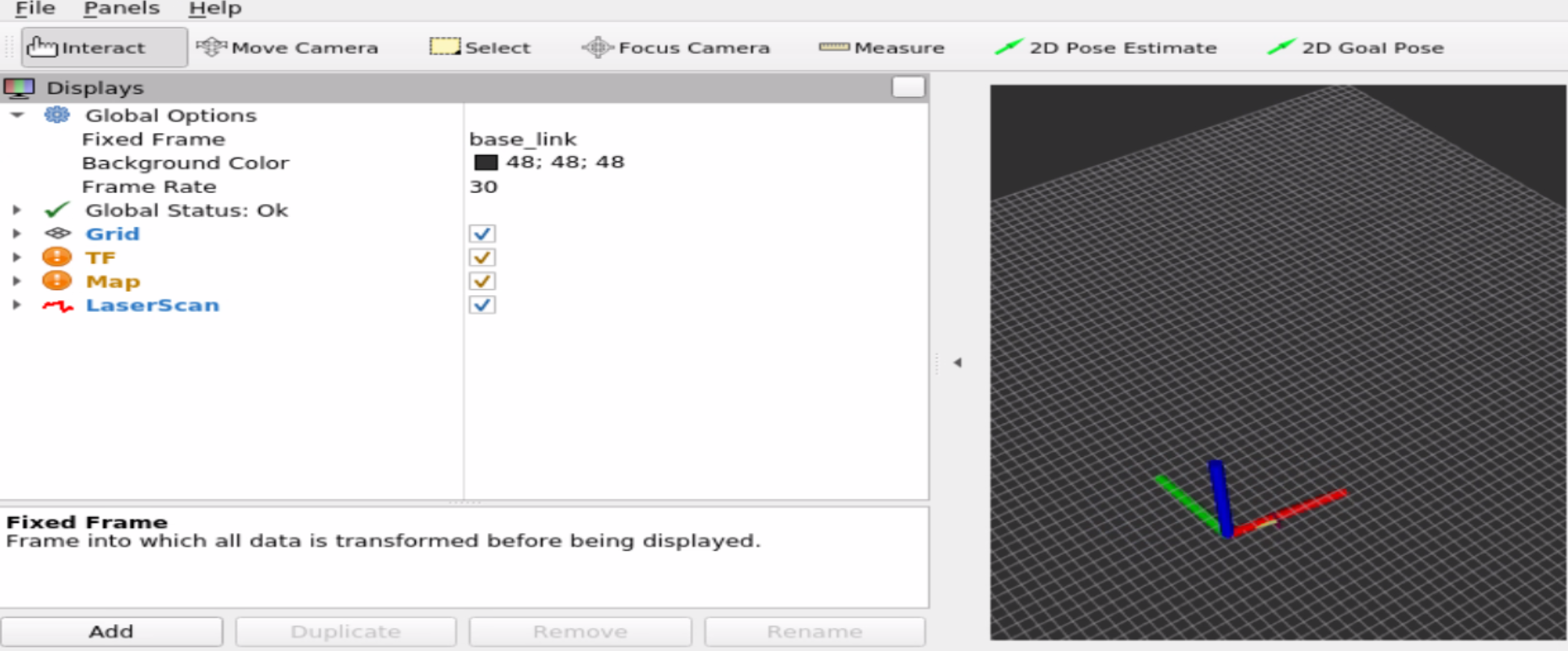
when in laser_frame, the scan appeared
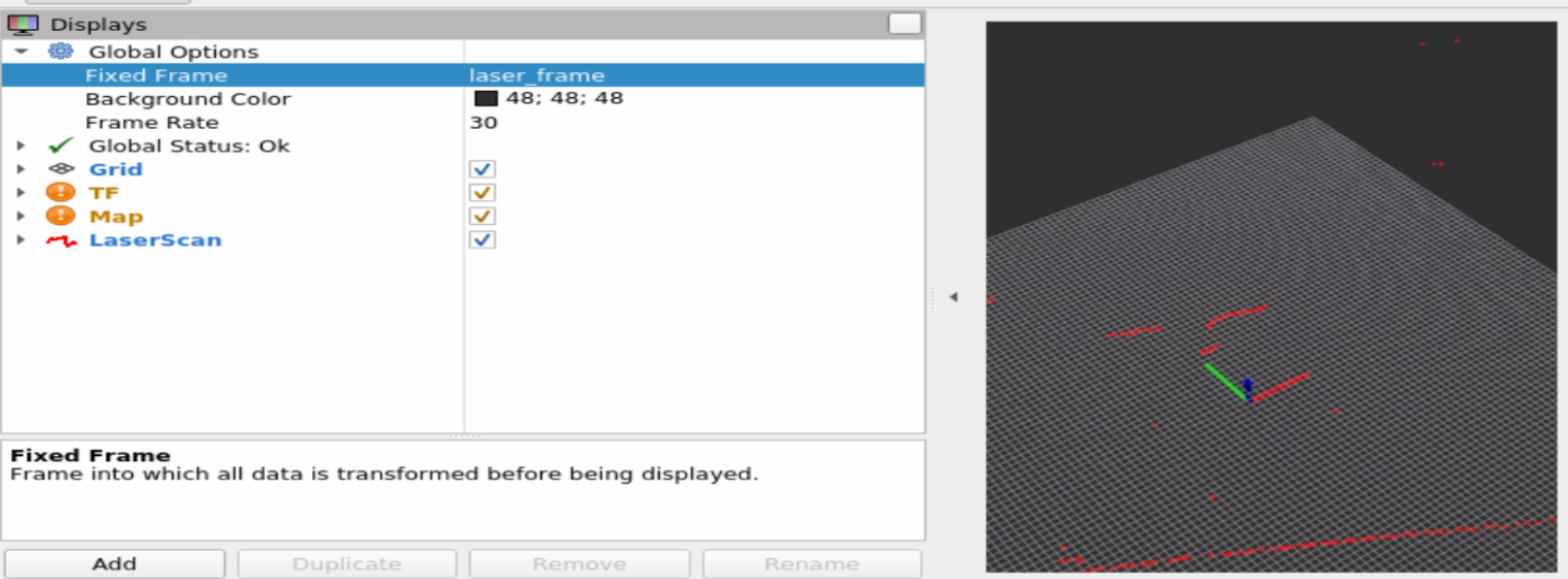
(the red U is my nose)
`
carlsondc-ceva commentedon May 29, 2024
It looks like the create3 nodes are not listed. You should see items like these, in addition to the rplidar node, slam_toolbox, etc.
The fact that you were able to use the keyboard teleop to drive is promising, though.
I've only ever set up my Create 3 to communicate over USB to the computer that's running the LIDAR and SLAM (in my case, a raspberry pi 4b).
I would look at the configuration through the Create 3's web management UI and see if that all jives with the ROS2 setup on the computer that's running the LIDAR / SLAM / RViz.
Are all of the commands you listed being run from the computer that's running LIDAR etc? Or are some of these on a different machine that's on the same network, or what?
mynameissagif commentedon May 30, 2024
thanks! I've solved the node list issue (by exporting ros definitions only after running the source files) but the problem still goes.
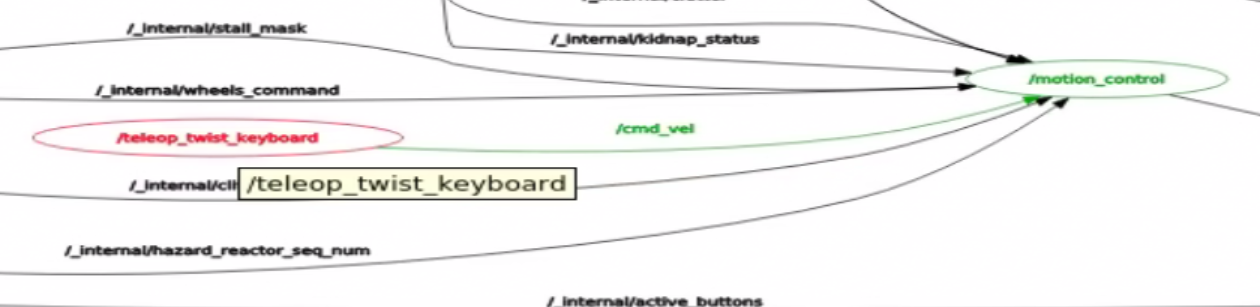
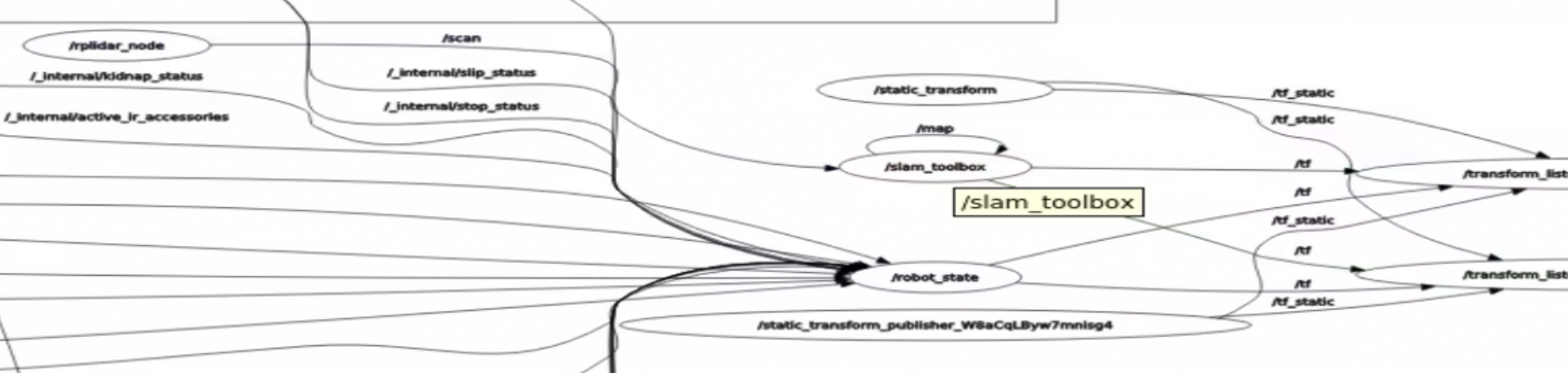
now it is:
root@jetson-desktop:/# ros2 node list /_internal/composite_hazard /_internal/kinematics_engine /_internal/mobility /_internal/stasis /mobility_monitor /motion_control /robot_state /rplidar_node /rviz /slam_toolbox /static_transform /static_transform_publisher_W8aCqLByw7mnisg4 /system_health /teleop_twist_keyboard /transform_listener_impl_559d64ab30 /transform_listener_impl_55c04fe870 /ui_mgrthe rqt_graph:
and view frames is:
root@jetson-desktop:/# ros2 run tf2_tools view_frames [INFO] [1717063439.773266894] [view_frames]: Listening to tf data for 5.0 seconds... [INFO] [1717063444.778491996] [view_frames]: Generating graph in frames.pdf file... [INFO] [1717063444.792359705] [view_frames]: Result:tf2_msgs.srv.FrameGraph_Response(frame_yaml="odom: \n parent: 'map'\n broadcaster: 'default_authority'\n rate: 2490000.000\n most_recent_transform: 0.200000\n oldest_transform: 0.200000\n buffer_length: 0.000\nlaser_frame: \n parent: 'base_footprint'\n broadcaster: 'default_authority'\n rate: 10000.000\n most_recent_transform: 0.000000\n oldest_transform: 0.000000\n buffer_length: 0.000\nbase_footprint: \n parent: 'odom'\n broadcaster: 'default_authority'\n rate: 20.369\n most_recent_transform: 1635449077.693671\n oldest_transform: 1635449074.846220\n buffer_length: 2.847\nbase_link: \n parent: 'odom'\n broadcaster: 'default_authority'\n rate: 20.369\n most_recent_transform: 1635449077.693671\n oldest_transform: 1635449074.846220\n buffer_length: 2.847\n")the teleops still works,
the slam_toolbox and rviz still reply
[slam_toolbox]: Message Filter dropping message: frame 'laser_frame' at time 1717063009.859 for reason 'discarding message because the queue is full'rviz in laser_frame shows every datapath to be OK except the map
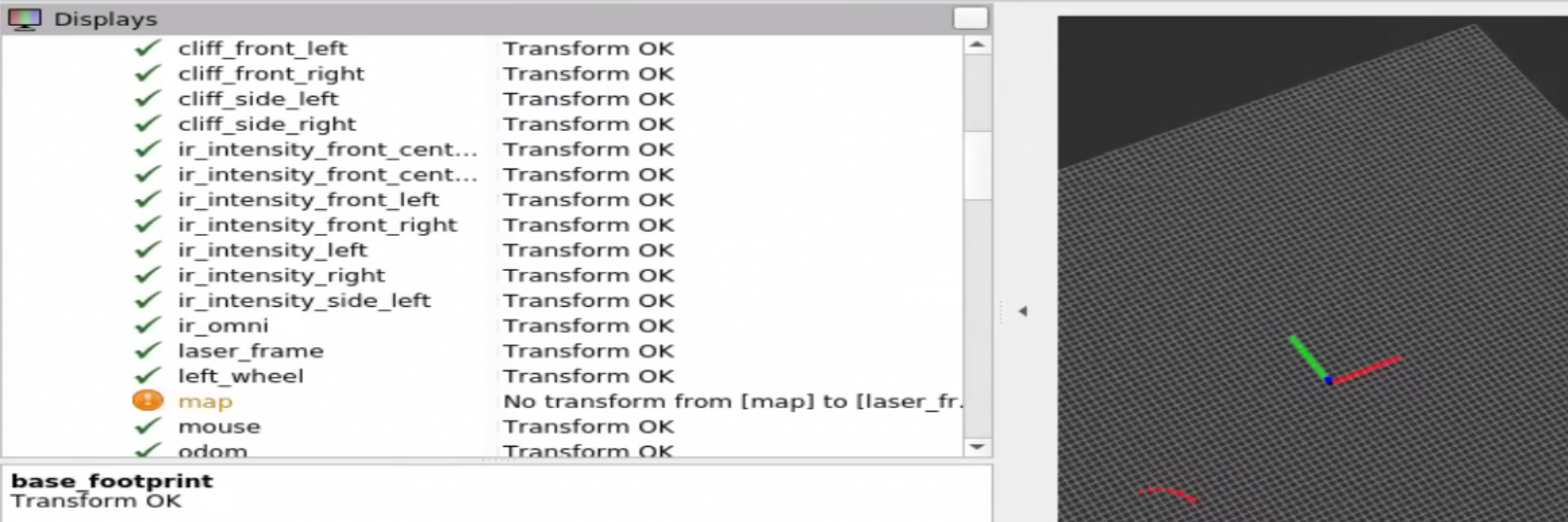
my setup is using a Jetson Nano connected via USB to both the rplidar and the irobot, and using it (via the Jetson Nano recommended galactic image) for all the applications (sensors, slam_toolbox, teleop and rviz) in parallel terminals of the same image, containing the files foe create3 and create3_examples
carlsondc-ceva commentedon May 30, 2024
OK. It looks like all of the parts are talking to each other, so that's a good sign. The
view_framesoutput has some hints that make me think the clock on your Create 3 is not set and it's not synching with the Jetson....base_link: \n parent: 'odom'\n broadcaster: 'default_authority'\n rate: 20.369\n most_recent_transform: 1635449077.693671\n oldest_transform: 1635449074.846220\n buffer_length: 2.847\n[INFO] [1717063444.792359705] [view_frames]: Result:...The setup I've used (due to lack of NTP access from the network I primarily use) is the one described here. It appears that there is more support for modifying the Create 3's NTP settings from the web server than the last time I had to monkey with this.
At a high level, slam_toolbox (and rviz) need to know how the laser scans are related to the robot's odometry frame. The odometry frame is basically the estimated position using just the wheels / IMU / etc -- no LIDAR or other methods to correct for the accumulation of errors. The messages you see basically mean "hey I have a bunch of laser scans I can't use because I'm still waiting for up-to-date odometry information. I'm going to throw away the old ones."
Once you've got the C3's clock set correctly, it will probably* work.
carlsondc-ceva commentedon May 31, 2024
@mynameissagif did you get it sorted out? If so, can you share your steps to fix for future reference?
mynameissagif commentedon Jun 1, 2024
hi, sorry, I haven't sorted it up yet but I'll get back to it after the weekend.
I did notice that when cloning the create3_examples galactic branch the code says
git clone https://github.com/iRobotEducation/create3_examples.gitand it clones the humble branch (_lidar_slam instead of _lidar) so I did
git clone https://github.com/iRobotEducation/create3_examples.git --branch galacticmynameissagif commentedon Jun 3, 2024
Hi again,
I've updated the irobot app to the latest 5.4 Galactic and matched the jetson's and irobot's NTP through the app. I chose a local NTP I got from my Uni.
Beforehand I tried to fix the problem through the instructor you linked and failed at the "sudo service chrony restart" command.
So, now in the Rviz at laser_frame we can see the walls and objects, in the base link we can see the orientation and in the odom we can see the robot move. The problem is that the map is still not created. (each one works on its own)
now, the salm_toolbox and rviz show the error:
[slam_toolbox]: Message Filter dropping message: frame 'laser_frame' at time 1717431202.543 for reason 'the timestamp on the message is earlier than all the data in the transform cache'the view_frames returned:
/# ros2 run tf2_tools view_frames [INFO] [1717431650.296215595] [view_frames]: Listening to tf data for 5.0 seconds... [INFO] [1717431655.302861635] [view_frames]: Generating graph in frames.pdf file... [INFO] [1717431655.315104187] [view_frames]: Result:tf2_msgs.srv.FrameGraph_Response(frame_yaml="odom: \n parent: 'map'\n broadcaster: 'default_authority'\n rate: 5150000.000\n most_recent_transform: 0.200000\n oldest_transform: 0.200000\n buffer_length: 0.000\nlaser_frame: \n parent: 'base_footprint'\n broadcaster: 'default_authority'\n rate: 10000.000\n most_recent_transform: 0.000000\n oldest_transform: 0.000000\n buffer_length: 0.000\nbase_footprint: \n parent: 'odom'\n broadcaster: 'default_authority'\n rate: 20.177\n most_recent_transform: 1717442373.465526\n oldest_transform: 1717442368.360646\n buffer_length: 5.105\ncliff_side_left: \n parent: 'base_link'\n broadcaster: 'default_authority'\n rate: 10000.000\n most_recent_transform: 0.000000\n oldest_transform: 0.000000\n buffer_length: 0.000\nbase_link: \n parent: 'odom'\n broadcaster: 'default_authority'\n rate: 20.177\n most_recent_transform: 1717442373.465526\n oldest_transform: 1717442368.360646\n buffer_length: 5.105\ncliff_front_left: \n parent: 'base_link'\n broadcaster: 'default_authority'\n rate: 10000.000\n most_recent_transform: 0.000000\n oldest_transform: 0.000000\n buffer_length: 0.000\ncliff_front_right: \n parent: 'base_link'\n broadcaster: 'default_authority'\n rate: 10000.000\n most_recent_transform: 0.000000\n oldest_transform: 0.000000\n buffer_length: 0.000\ncliff_side_right: \n parent: 'base_link'\n broadcaster: 'default_authority'\n rate: 10000.000\n most_recent_transform: 0.000000\n oldest_transform: 0.000000\n buffer_length: 0.000\nbump_left: \n parent: 'base_link'\n broadcaster: 'default_authority'\n rate: 10000.000\n most_recent_transform: 0.000000\n oldest_transform: 0.000000\n buffer_length: 0.000\nbump_front_left: \n parent: 'base_link'\n broadcaster: 'default_authority'\n rate: 10000.000\n most_recent_transform: 0.000000\n oldest_transform: 0.000000\n buffer_length: 0.000\nbump_front_center: \n parent: 'base_link'\n broadcaster: 'default_authority'\n rate: 10000.000\n most_recent_transform: 0.000000\n oldest_transform: 0.000000\n buffer_length: 0.000\nbump_front_right: \n parent: 'base_link'\n broadcaster: 'default_authority'\n rate: 10000.000\n most_recent_transform: 0.000000\n oldest_transform: 0.000000\n buffer_length: 0.000\nbump_right: \n parent: 'base_link'\n broadcaster: 'default_authority'\n rate: 10000.000\n most_recent_transform: 0.000000\n oldest_transform: 0.000000\n buffer_length: 0.000\nir_intensity_side_left: \n parent: 'base_link'\n broadcaster: 'default_authority'\n rate: 10000.000\n most_recent_transform: 0.000000\n oldest_transform: 0.000000\n buffer_length: 0.000\nir_intensity_left: \n parent: 'base_link'\n broadcaster: 'default_authority'\n rate: 10000.000\n most_recent_transform: 0.000000\n oldest_transform: 0.000000\n buffer_length: 0.000\nir_intensity_front_left: \n parent: 'base_link'\n broadcaster: 'default_authority'\n rate: 10000.000\n most_recent_transform: 0.000000\n oldest_transform: 0.000000\n buffer_length: 0.000\nir_intensity_front_center_left: \n parent: 'base_link'\n broadcaster: 'default_authority'\n rate: 10000.000\n most_recent_transform: 0.000000\n oldest_transform: 0.000000\n buffer_length: 0.000\nir_intensity_front_center_right: \n parent: 'base_link'\n broadcaster: 'default_authority'\n rate: 10000.000\n most_recent_transform: 0.000000\n oldest_transform: 0.000000\n buffer_length: 0.000\nir_intensity_front_right: \n parent: 'base_link'\n broadcaster: 'default_authority'\n rate: 10000.000\n most_recent_transform: 0.000000\n oldest_transform: 0.000000\n buffer_length: 0.000\nir_intensity_right: \n parent: 'base_link'\n broadcaster: 'default_authority'\n rate: 10000.000\n most_recent_transform: 0.000000\n oldest_transform: 0.000000\n buffer_length: 0.000\nir_omni: \n parent: 'base_link'\n broadcaster: 'default_authority'\n rate: 10000.000\n most_recent_transform: 0.000000\n oldest_transform: 0.000000\n buffer_length: 0.000\nmouse: \n parent: 'base_link'\n broadcaster: 'default_authority'\n rate: 10000.000\n most_recent_transform: 0.000000\n oldest_transform: 0.000000\n buffer_length: 0.000\nleft_wheel: \n parent: 'base_link'\n broadcaster: 'default_authority'\n rate: 10000.000\n most_recent_transform: 0.000000\n oldest_transform: 0.000000\n buffer_length: 0.000\nright_wheel: \n parent: 'base_link'\n broadcaster: 'default_authority'\n rate: 10000.000\n most_recent_transform: 0.000000\n oldest_transform: 0.000000\n buffer_length: 0.000\nbutton_1: \n parent: 'base_link'\n broadcaster: 'default_authority'\n rate: 10000.000\n most_recent_transform: 0.000000\n oldest_transform: 0.000000\n buffer_length: 0.000\nbutton_2: \n parent: 'base_link'\n broadcaster: 'default_authority'\n rate: 10000.000\n most_recent_transform: 0.000000\n oldest_transform: 0.000000\n buffer_length: 0.000\nbutton_power: \n parent: 'base_link'\n broadcaster: 'default_authority'\n rate: 10000.000\n most_recent_transform: 0.000000\n oldest_transform: 0.000000\n buffer_length: 0.000\nimu: \n parent: 'base_link'\n broadcaster: 'default_authority'\n rate: 10000.000\n most_recent_transforoot@jetson-desktop:/#mynameissagif commentedon Jun 19, 2024
hi,
have you managed to look at it again?
carlsondc-ceva commentedon Jun 19, 2024
have you verified the clocks are lined up? easiest way to check is to do a
rosbag record -aon the machine that is running the SLAM algorithm and share the resulting files.mynameissagif commentedon Jun 24, 2024
hi, got:
/# ros2 bag record -a [INFO] [1719236669.705567997] [rosbag2_storage]: Opened database 'rosbag2_2024_06_24-13_44_29/rosbag2_2024_06_24-13_44_29_0.db3' for READ_WRITE. [INFO] [1719236669.706105654] [rosbag2_recorder]: Listening for topics... [INFO] [1719236669.714908518] [rosbag2_recorder]: Subscribed to topic '/cmd_vel' [INFO] [1719236669.719816487] [rosbag2_recorder]: Subscribed to topic '/map' [INFO] [1719236669.734333883] [rosbag2_recorder]: Subscribed to topic '/slam_toolbox/graph_visualization' [INFO] [1719236669.738430602] [rosbag2_recorder]: Subscribed to topic '/map_metadata' [INFO] [1719236669.745730810] [rosbag2_recorder]: Subscribed to topic '/parameter_events' [INFO] [1719236669.760049195] [rosbag2_recorder]: Subscribed to topic '/rosout' [INFO] [1719236669.765838987] [rosbag2_recorder]: Subscribed to topic '/scan' [INFO] [1719236669.781369924] [rosbag2_recorder]: Subscribed to topic '/slam_toolbox/feedback' [INFO] [1719236669.784356174] [rosbag2_recorder]: Subscribed to topic '/slam_toolbox/scan_visualization' [INFO] [1719236669.828831383] [rosbag2_recorder]: Subscribed to topic '/tf' [INFO] [1719236669.833252633] [rosbag2_recorder]: Subscribed to topic '/slam_toolbox/update' [INFO] [1719236669.836353883] [rosbag2_recorder]: Subscribed to topic '/tf_static' [WARN] [1719236669.839373622] [rosbag2_transport]: Hidden topics are not recorded. Enable them with --include-hidden-topics [INFO] [1719236669.854691851] [rosbag2_recorder]: Subscribed to topic '/goal_pose' [INFO] [1719236669.877468570] [rosbag2_recorder]: Subscribed to topic '/cmd_lightring' [INFO] [1719236669.887759924] [rosbag2_recorder]: Subscribed to topic '/cmd_audio' [WARN] [1719236669.888592424] [rosbag2_recorder]: New publisher discovered on topic '/cmd_lightring', offering incompatible QoS. No messages will be sent to it. Last incompatible policy: RELIABILITY_QOS_POLICY [INFO] [1719236669.891885810] [rosbag2_recorder]: Subscribed to topic '/map_updates' [INFO] [1719236669.896949143] [rosbag2_recorder]: Subscribed to topic '/clicked_point' [INFO] [1719236669.904738310] [rosbag2_recorder]: Subscribed to topic '/initialpose' [WARN] [1719236670.015745653] [rosbag2_recorder]: A new publisher for subscribed topic /cmd_lightring was found offering RMW_QOS_POLICY_RELIABILITY_BEST_EFFORT, but rosbag already subscribed requesting RMW_QOS_POLICY_RELIABILITY_RELIABLE. Messages from this new publisher will not be recorded. [INFO] [1719236670.020602685] [rosbag2_recorder]: Subscribed to topic '/wheel_status' [INFO] [1719236670.026530497] [rosbag2_recorder]: Subscribed to topic '/ir_opcode' [INFO] [1719236670.032902581] [rosbag2_recorder]: Subscribed to topic '/interface_buttons' [INFO] [1719236670.040173101] [rosbag2_recorder]: Subscribed to topic '/hazard_detection' [INFO] [1719236670.043717424] [rosbag2_recorder]: Subscribed to topic '/imu' [INFO] [1719236670.047684456] [rosbag2_recorder]: Subscribed to topic '/dock' [INFO] [1719236670.057418935] [rosbag2_recorder]: Subscribed to topic '/odom' [INFO] [1719236670.065148778] [rosbag2_recorder]: Subscribed to topic '/ir_intensity' [INFO] [1719236670.075317372] [rosbag2_recorder]: Subscribed to topic '/static_transform/transition_event' [INFO] [1719236670.080436331] [rosbag2_recorder]: Subscribed to topic '/mouse' [INFO] [1719236670.101900653] [rosbag2_recorder]: Subscribed to topic '/cliff_intensity' [INFO] [1719236670.108971591] [rosbag2_recorder]: Subscribed to topic '/kidnap_status' [INFO] [1719236670.113610914] [rosbag2_recorder]: Subscribed to topic '/battery_state' [INFO] [1719236670.119334351] [rosbag2_recorder]: Subscribed to topic '/stop_status' [INFO] [1719236670.124011331] [rosbag2_recorder]: Subscribed to topic '/robot_state/transition_event' [INFO] [1719236670.128027528] [rosbag2_recorder]: Subscribed to topic '/slip_status' [INFO] [1719236670.132777424] [rosbag2_recorder]: Subscribed to topic '/mobility_monitor/transition_event' [INFO] [1719236670.139566018] [rosbag2_recorder]: Subscribed to topic '/wheel_ticks' [INFO] [1719236670.143117164] [rosbag2_recorder]: Subscribed to topic '/wheel_vels'when view_framing, I get 1717444149.893611 21 days ago, probably the last time I edited the create3's NTP. This means that the fix for the clock problem hasn't been working properly.
carlsondc-ceva commentedon Jun 24, 2024
OK. if you can upload the resulting bag (contents of
rosbag2_2024_06_24-13_44_29directory), then we can look at it specifically, but you are right that the clock synchronization issue has not yet been resolved. This is almost certainly the issue.In my case, I let the compute board (a raspberry pi) act as the NTP server for the Create 3 robot and it worked great. The instructions for that setup are here: https://iroboteducation.github.io/create3_docs/setup/compute-ntp/
mynameissagif commentedon Jun 24, 2024
I am working within the recommended docker of Nvidia which I updated for the create3 examples.
I'm unable to move the rosbag to an accessible location and reading it (via vim or nano) results in an extremely long text which seems to be partially corrupted. on the same note while trying to update the NTP I am unable to restart the chrony due to not having the required permission within the docker.
carlsondc-ceva commentedon Jun 24, 2024
OK. I don't have any recommendations for your docker issue-- maybe the right person from iRobot (@alsora ? @shamlian ?) could help you out there, or help you debug the NTP settings on the Create 3.
It's not that important to open the rosbag at this point-- I wanted to see whether the "bag time" of messages (the time it was recorded) matched up with the timestamps in the headers of the messages themselves (the time that was assigned by the originator). Based on your observations, I'm quite sure that messages originating from the Create3 platform will not match and don't need to see the bag contents to verify that.
The rosbag is a binary SQLITE3 database, so it won't be meaningful in a text editor. You can open it with the sqlite3 command line tool or with various rosbag libraries (Python or C++), in case you are interested.
shamlian commentedon Jun 26, 2024
I'm sorry that I can't help with NVIDIA's docker image. My experience has been that most customers have had more success running ROS 2 natively on the OS install on their dev board rather than use NVIDIA's docker image. @brianabouchard might have thoughts about that.
As far as time sync, it would be helpful for me to see a log from the robot after you restart ntpd using the web interface. Have you also edited the robot's ntpd.conf? Please let us know if you've made changes there. Is the robot's only network connection a wired one to the Jetson Nano, or is it also connected to Wi-Fi? If it's only connected wired, is the Jetson running an ntp server?
mynameissagif commentedon Jul 8, 2024
Hi,
The time issue has been fixed (accordint to
ros2 run tf2_tools view_frames) but we still can't run the slam successfully. The Irobot's log after restarting is :messages.txtWe edited the ntpd.conf. We are using a wired connection only to a jetson from the irobot and the jetson is running an ntp server based on the tutorial: https://iroboteducation.github.io/create3_docs/setup/compute-ntp/ , which succeeds in describing the Irobot a client