




Know whether a dependency is safe to bump — without leaving your editor. deps-lsp is a
universal Language Server Protocol (LSP) server that brings hover, completion, diagnostics, and
quick fixes for outdated, vulnerable, yanked, and unsatisfiable dependencies to any manifest file,
across 14 package ecosystems: Cargo, npm, Deno, PyPI, Go, Bundler, Dart, Maven, Gradle, Swift,
Composer, NuGet, GitHub Actions, and GitLab CI/CD. One binary, no per-language extensions to
install and keep in sync.
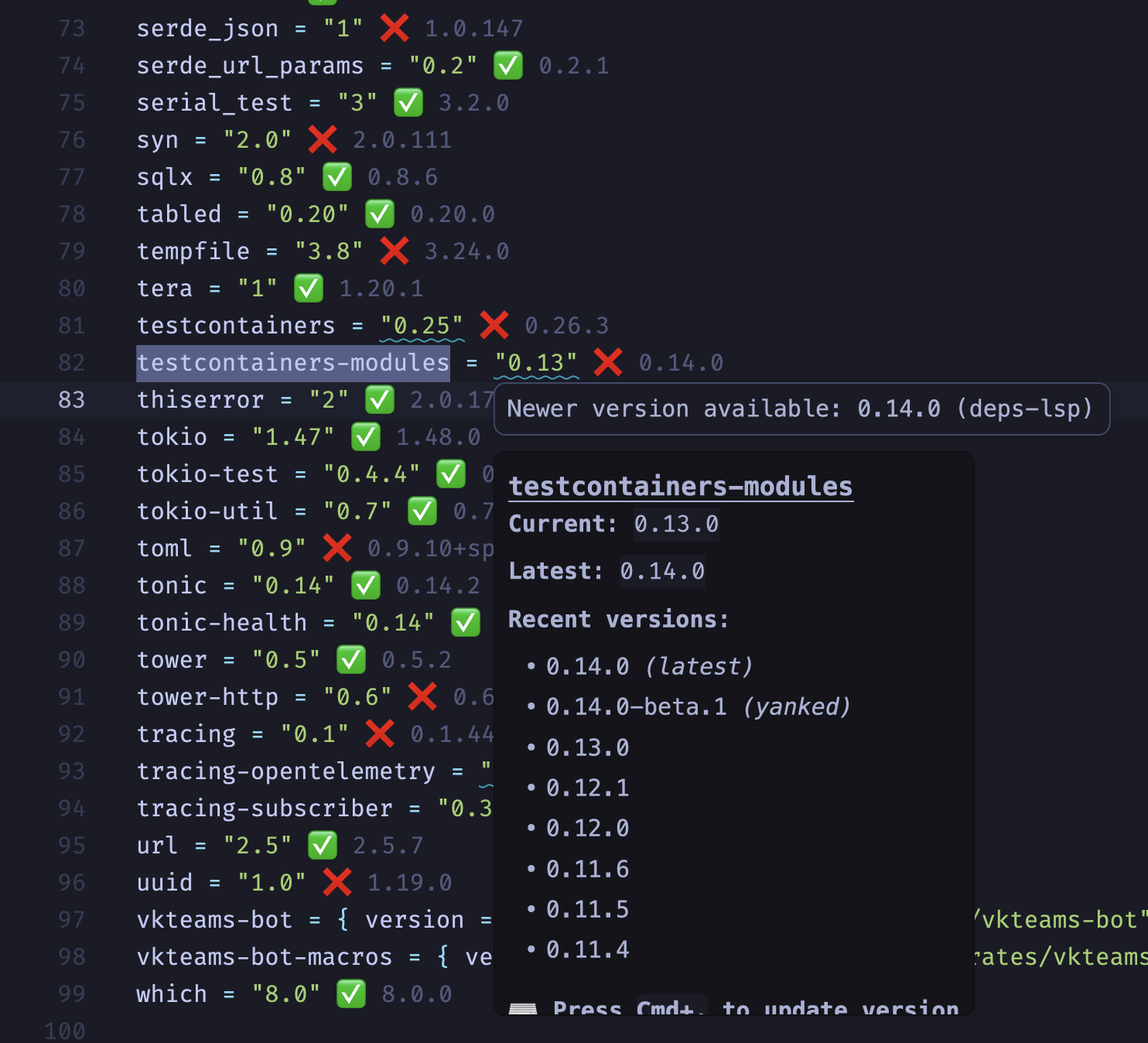
- Inline version awareness — Inlay hints show at a glance which dependencies are current and which have a newer release, right next to the version you wrote.
- Rich hover — Package description, resolved vs. latest version, license, and security advisories, without leaving the manifest.
- Vulnerability & license scanning — OSV.dev-backed advisories and SPDX license/policy checks surface as diagnostics and quick fixes, not just as a separate CI step you find out about later.
- Supply-chain trust signal — OpenSSF Scorecard and SLSA/attestation provenance in hover, so you can judge a dependency's health before pulling it in.
- Typosquat detection (opt-in) — flags a declared dependency whose name deps.dev reports as suspiciously similar to a much more popular package, across Cargo, npm, PyPI, Go, Bundler, Maven, and NuGet.
- Opt-in deps.dev signals (GOSSIP) — with
gossip.enabled, hover and diagnostics take the outdated-cooldown callout from deps.dev's Dynamic Cooldown data and add a low-usage / slopsquatting-risk warning for the pinned version. - Safe upgrade recommendations — every version offered as an update target is independently
checked against OSV, so a flagged or malicious release is never suggested as a safe upgrade;
an unresolved version placeholder (
${VAR},$(VAR),%VAR%) is never overwritten by a fix. - CI supply-chain pinning — GitHub Actions and GitLab CI/CD SHA pins are resolved through the
repository's tag index, so a pin is checked, flagged as outdated, or re-pinned to the latest
release's SHA, and a
# vXcomment that does not match the pinned commit is reported. - Lock-file aware — Reads the version you actually have installed, not just the range you wrote, across every ecosystem that has a lock file.
- One-click fixes — Code actions to bump a version, resolve an unsatisfiable range, or patch a known vulnerability; a code lens batch-updates every outdated dependency in the file at once.
- Fast — Parallel registry fetching and aggressive caching keep hover and inlay hints responsive even on manifests with hundreds of dependencies.
| Language | Ecosystem | Manifest file |
|---|---|---|
| Rust | Cargo | Cargo.toml |
| JavaScript | npm | package.json |
| JavaScript/TypeScript | Deno (JSR/npm) | deno.json, deno.jsonc |
| Python | PyPI | pyproject.toml, requirements.txt, constraints.txt |
| Go | Go Modules | go.mod |
| Ruby | Bundler | Gemfile |
| Dart | Pub | pubspec.yaml |
| Java | Maven | pom.xml |
| Java | Gradle | libs.versions.toml, build.gradle.kts, build.gradle, settings.gradle |
| Swift | SPM | Package.swift |
| PHP | Composer | composer.json |
| C# | NuGet | .csproj, .fsproj, .vbproj, Directory.Packages.props, packages.config |
| YAML | GitHub Actions | .github/workflows/*.yml, *.yaml; action.yml, action.yaml |
| YAML | GitLab CI/CD | .gitlab-ci.yml, .gitlab/ci/*.yml, *.yaml |
Coverage depth (custom registries, lock file support, pseudo-versions, and other per-ecosystem detail) is documented per ecosystem in the Ecosystem Reference.
cargo install deps-lspTip
Use cargo binstall deps-lsp for faster installation without compilation.
Download from GitHub Releases:
| Platform | Architecture | Binary |
|---|---|---|
| Linux | x86_64 (glibc) | deps-lsp-x86_64-unknown-linux-gnu |
| Linux | aarch64 (glibc) | deps-lsp-aarch64-unknown-linux-gnu |
| Linux | x86_64 (musl) | deps-lsp-x86_64-unknown-linux-musl |
| Linux | aarch64 (musl) | deps-lsp-aarch64-unknown-linux-musl |
| macOS | x86_64 | deps-lsp-x86_64-apple-darwin |
| macOS | Apple Silicon | deps-lsp-aarch64-apple-darwin |
| Windows | x86_64 | deps-lsp-x86_64-pc-windows-msvc.exe |
| Windows | ARM64 | deps-lsp-aarch64-pc-windows-msvc.exe |
Every archive is signed with Sigstore/cosign in addition to its SHA256 checksum — see Verifying Release Artifacts for how to check it.
git clone https://github.com/bug-ops/deps-lsp
cd deps-lsp
cargo install --path crates/deps-lspAll 14 ecosystems are enabled by default. Build with only the ones you need via Cargo feature
flags, e.g. cargo install deps-lsp --no-default-features --features "cargo,npm" — the flag name
always matches the ecosystem's row in the table above (cargo, npm, pypi, go, ...). See
crates/deps-lsp/Cargo.toml for the full flag list.
Run the server over stdio (typical editor integration):
deps-lsp --stdioInstall the Deps extension from the Zed Extensions marketplace (Ruby support included for
Gemfile), then enable inlay hints and code lens in Zed settings:
{
  "inlay_hints": { "enabled": true },
  "code_lens": "on"
}
Every other editor with an LSP client — Neovim, Helix, VS Code, Emacs, Sublime Text, Kate,
coc.nvim — works the same way: point it at deps-lsp --stdio. Full copy-paste config for each one
lives in the book's
Editor Setup chapter.
deps-cli runs the same dependency checks as an editor-free
command-line tool, for CI pipelines, pre-commit hooks, and shell scripts. Every verdict comes
from the identical classification function deps-lsp uses for its diagnostics, so a
deps-cli check result and an editor's diagnostics for the same manifest never disagree.
curl -fsSL https://raw.githubusercontent.com/bug-ops/deps-lsp/main/scripts/install-deps-cli.sh | sh
deps-cli check --format sarif > results.sarif
Or run it via Docker, no install at all:
docker run --rm -v "$PWD:/workspace" -w /workspace \
--entrypoint deps-cli ghcr.io/bug-ops/deps-lsp-github-action:1 check- Output formats: human-readable table (default), versioned JSON, or SARIF 2.1.0 for
github/codeql-action/upload-sarif deps-cli update <MANIFEST>: plans and atomically writes back version-requirement edits for outdated (default, honoring the freshness cooldown) or OSV-vulnerable (--security-only) dependencies, with--package,--dry-run, and--format table|json— seecrates/deps-cli/README.md- Pre-commit hook:
deps-lsp-check, runsdeps-cli checkagainst staged files - GitHub Action: a Docker-based action wrapping
deps-cli check --format sarif, leavingupload-sarifto your own workflow
See crates/deps-cli/README.md for other install options
(cargo install, pre-built binaries, from source), the full flag reference, deps.toml schema,
and exit-code contract.
Everything is configured through LSP initializationOptions — no separate config file. A typical
setup only touches a handful of options:
{
  "inlay_hints": { "enabled": true },
  "diagnostics": { "outdated_severity": "hint", "vulnerabilities_enabled": true },
  "freshness": { "enabled": true, "cooldown_secs": 259200 },
  "gossip": { "enabled": false },
  "typosquat": { "enabled": false },
  "network": { "offline": false },
  "license_policy": { "allow": [], "deny": [] }
}
Every section, option, default, and edge case — including the inlay hint icon legend and the hover/diagnostic text conventions — is documented in the book's Configuration chapter.
Some ecosystems (Swift, GitHub Actions) resolve versions via the GitHub API, which is limited to
60 requests/hour without authentication. Set GITHUB_TOKEN to raise the limit to 5,000
requests/hour:
export GITHUB_TOKEN=$(gh auth token) # or a PAT from https://github.com/settings/tokens — no scopes requiredSet GITLAB_TOKEN to a GitLab Personal or Project Access Token to raise GitLab CI/CD's
unauthenticated rate limit and access private projects. It is sent as PRIVATE-TOKEN only to
gitlab.com (default) or, for a self-hosted instance, to the host named by GITLAB_TOKEN_HOST —
never to a host taken from editor settings:
export GITLAB_TOKEN=glpat-...
export GITLAB_TOKEN_HOST=gitlab.mycorp.dev # self-hosted only; omit for gitlab.comRequires Rust 1.98+ (Edition 2024). See CONTRIBUTING.md for the full setup,
build, test, and lint commands, and the book's
Architecture Overview
for how the Ecosystem trait ties ecosystem crates into the LSP server, the workspace's
project structure, and
its
performance characteristics.
deps-core's public trait signatures are typed directly against pre-1.0 tower-lsp-server types,
which has consequences for anyone implementing Ecosystem outside this workspace — see the book's
Versioning Policy.
Read CONTRIBUTING.md for setup, style, and testing expectations.
Inspired by:
- crates-lsp — Cargo.toml LSP
- dependi — Multi-ecosystem dependency management
- taplo — TOML toolkit