
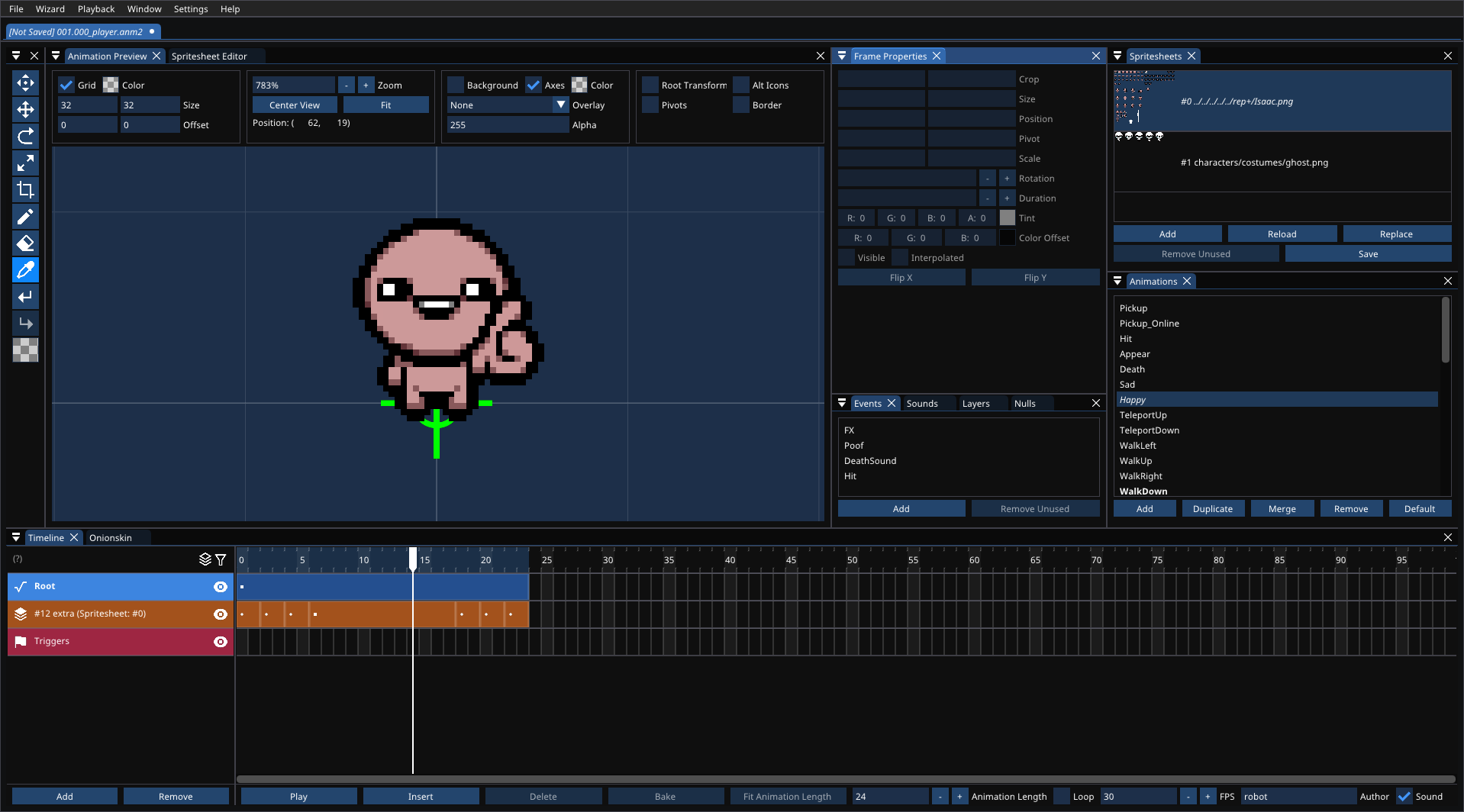
Anm2Ed is a modern editor for The Binding of Isaac: Rebirth's XML-based .anm2 animation format. It is built as an extended, more comfortable replacement for the original proprietary animation editor, with a dockable Dear ImGui interface and tools aimed at both quick edits and larger animation workflows.
This application was developed with the assistance of a large language model.
- Full
.anm2editing: spritesheets (PNG or SVG), regions, layers, nulls, events, sounds, shaders, animations, frames and triggers (several events each). - Animation layers: a layer can play another animation, from the same file or a linked library (
.anm2), with per-keyframe loop/once/hold, start frame and restart. The timeline shows the child's tracks under the layer; double-click to edit the child in place, with a breadcrumb back out. - Dockable Dear ImGui interface (windows can be detached into their own) with persistent layout, drag and drop, context menus and rebindable shortcuts.
- Timeline: multi-select, cut/copy/paste (whole frames or single properties), duplicate, split, bake, drag to move/resize, and start/end markers to loop a range.
- Groups for animations, layers and nulls, with group transforms baked for the game on save.
- Frame properties for crop, size, position, pivot, scale, skew, rotation, depth, tint, color offset (with alpha), blur (Flash's blur filter), region, shader, visibility, interpolation (including easing) and flips; batch changes across selections.
- Spritesheet editor with pan, move, crop, draw, erase and color picker tools; regions; packing, merging, trimming; spritesheets and libraries reload when their files change on disk.
- Animation preview with grid, axes, pivots, borders, onionskin (with pivot paths), and another document's animation as an overlay.
- Wizards: generate animations from a grid, generate regions, change all frame properties, merge animations and files.
- Render to video, GIF, spritesheet or PNG sequence (FFmpeg), with trigger sounds.
- Saves write the game's format with the editor's own copy embedded (
SourceDocument), so nothing is lost; animation layers are flattened for the game, and anything else the game doesn't support is warned about first. Documents can instead be saved as the editor's own, human-readable JSON (format), which opens like any.anm2. - Undo/redo, autosave (spritesheet edits included) with crash restore, and overwrite warnings.
- English
- Español (Latinoamérica) (Spanish (Latin America))
- Pусский (Russian)
- 中文 (Chinese)
- 한국어 (Korean)
If you want to help localize for your language, feel free to get in touch to contribute.
FFmpeg is required for video/GIF-style export. Download it from ffmpeg.org, then point Anm2Ed to the ffmpeg executable in the render window.
After cloning and entering the repository directory, initialize the submodules:
git submodule update --init --recursiveVisual Studio is recommended.
cmake -B build -DCMAKE_BUILD_TYPE=Release
cmake --build build -jctest --test-dir buildRender tests draw with OpenGL (skipped without a display) and leave their images in build/renders.
anm2ed <command> looks at a file without opening the editor, drawing with the editor's renderer:
anm2ed info   file.anm2                               # animations, items, spritesheets, Isaac issues
anm2ed frame  file.anm2 --out frame.png --time 4      # one frame
anm2ed render file.anm2 --out sheet.png --scale 3     # every frame in a grid (--type pngs|gif|webm|mp4|ogv)
Common options: --animation NAME|INDEX, --scale, --fps, --start/--end, --background RRGGBB, --ffmpeg PATH (defaults to the editor's FFmpeg setting). anm2ed render alone lists them all.