
基于 SeedVR2 扩散模型的视频与图像超分辨率修复工具箱 —— 独立运行、一键修复,无需 ComfyUI。
A standalone video & image super-resolution toolkit powered by SeedVR2 diffusion models. One-click restoration via Web UI — no ComfyUI required.







治理规范 / Governance:ReSerendipity/.github/governance
SeedVR2-Lite 把字节跳动 Seed 团队与南洋理工大学 S-Lab 联合开源的 SeedVR2 单步扩散修复模型,包装成一个独立运行的本地 Web 应用:上传一张图片或一段视频,即可完成超分辨率与细节增强,数据全程不出本机。它不依赖 ComfyUI,也不需要任何外部推理服务。
对外正式分发为 Tauri v2 桌面版(离线完整包解压即用);开发者也可以直接用源码或便携分卷包在浏览器中运行。当前稳定版本为 v1.6.1。
- 视频与图像修复:基于单步扩散模型的超分辨率与细节增强,本地推理、数据不出机器。
- 三档模型:3B / 7B / 7B-Sharp,支持 FP16 / FP8 及 MXFP8 / NVFP4 / INT8-convrot 量化变体(
.safetensors,不兼容 GGUF)。 - 显存友好:GPU Block Swap 在推理时动态换入换出 Transformer 块;3B FP8 可在 8 GB 显存起步运行。
- 批量与断点续跑:单文件修复 + 文件夹批量扫描,批量任务在
data/checkpoints/记录进度,中断后可续跑。 - 开箱即用的桌面版:Tauri 原生窗口、系统托盘、Windows Toast 通知、文件拖拽、单实例与崩溃自动恢复、托盘增量更新。
- 多语言与实时监控:界面支持简体中文、繁体中文、英文、日文、法文;GPU/显存/内存与任务进度经 SSE 实时推送。
以下截图均在云端 Linux(无 GPU)真实启动 Web UI 后截取,浅色主题;无 GPU 时界面如实显示降级状态。
首页仪表盘 —— 一句话定位、入口卡片与状态角标。本图在无 GPU 云环境启动,角标显示「未检测到可用 GPU · 未加载」;有 GPU 时此处显示设备型号与当前模型。

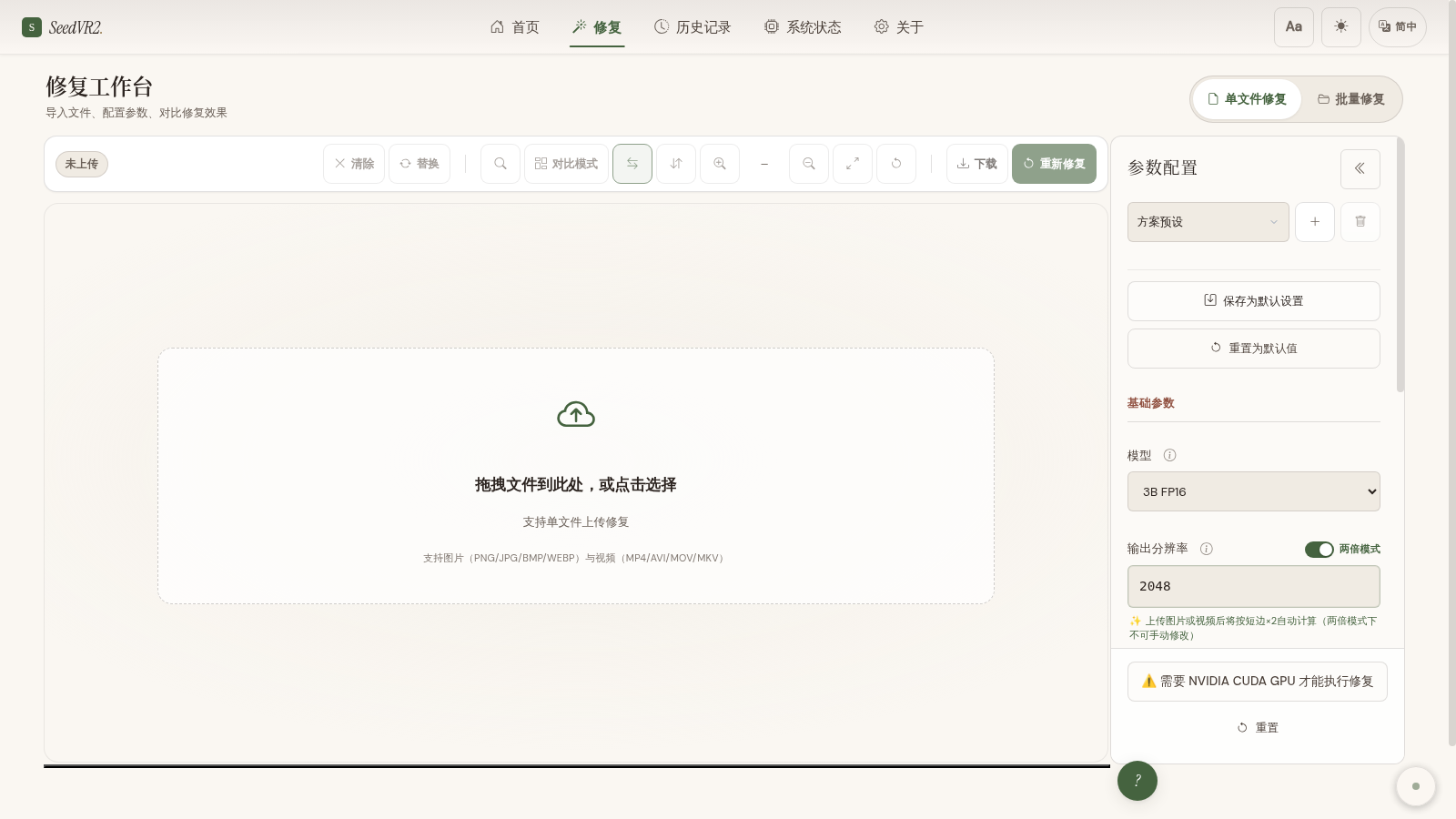
修复工作台 —— 左侧拖拽上传图片/视频,右侧参数面板选择模型、输出分辨率与 VAE。无 GPU 时顶部提示「需要 NVIDIA CUDA GPU 才能执行修复」,界面与参数仍可完整查看。
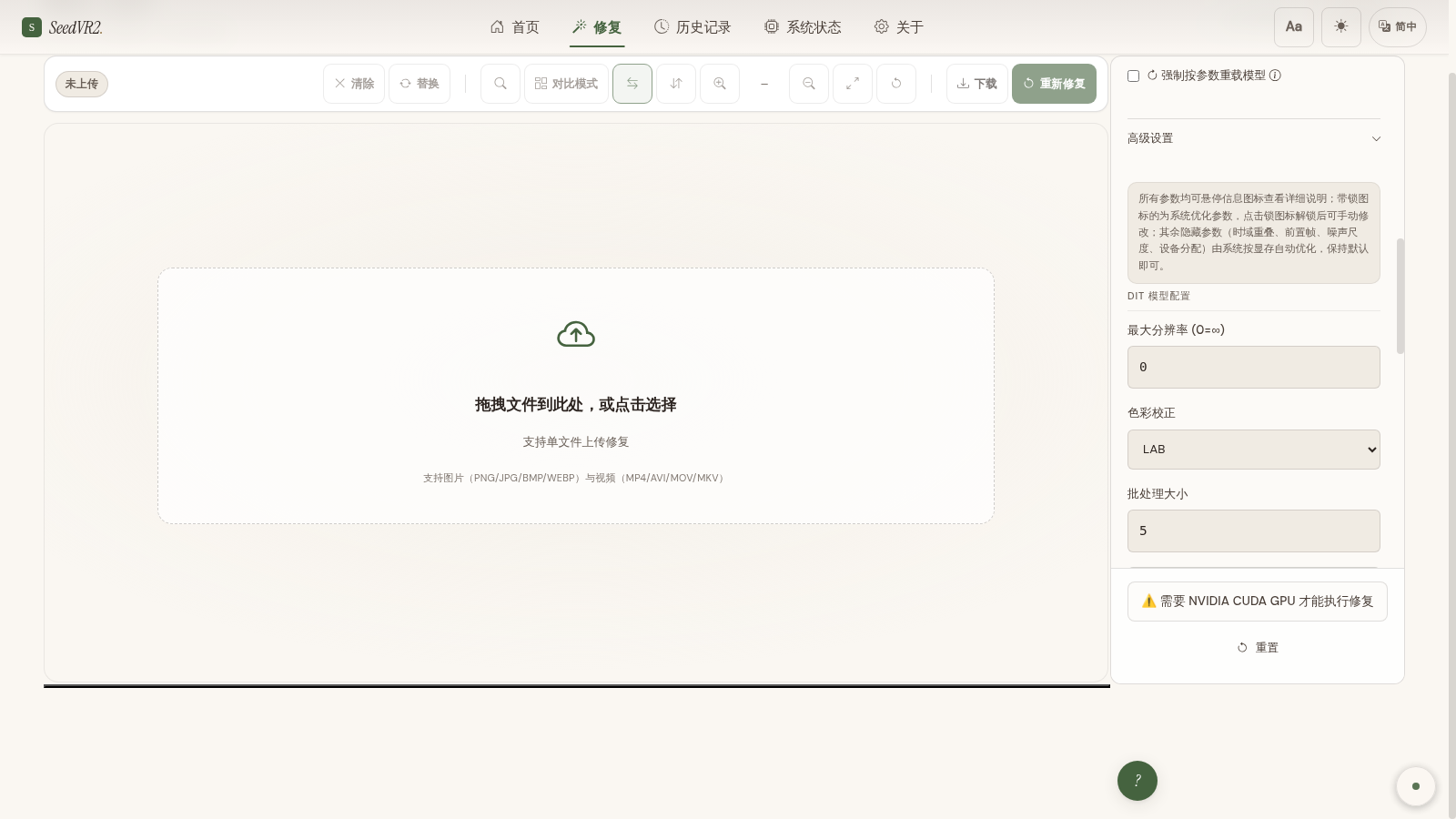
高级参数 —— 展开 DiT 配置(最大分辨率、色彩校正、块交换数量、批处理大小),并可一键「VRAM 预检 & 推荐参数」。
历史记录 —— 表格视图管理已完成任务,支持状态筛选与结果回看。

系统状态 —— GPU/显存/利用率与内存监控。本图为无 GPU 云环境:GPU 卡片标记 UNAVAILABLE、显存字段为 --;真实 GPU 环境此处显示显卡型号、显存占用与利用率曲线。

整体架构 —— 浏览器/桌面壳 → FastAPI 后端 → 扩散推理引擎(DiT + Video VAE + Block Swap),本地存储模型、历史与输出。

推荐普通用户直接下载桌面版离线完整包,解压即用。以下为从源码运行的路径。
1. 环境
- Windows x64、NVIDIA CUDA GPU(必须,不支持纯 CPU 推理)、Python 3.12+。
- 磁盘预留 ≥ 15 GB;视频修复需自行安装 FFmpeg 并加入 PATH(因许可证原因不随包分发,见 NOTICE)。
2. 安装依赖
git clone https://github.com/ReSerendipity/SeedVR2-Lite.git
cd SeedVR2-Lite

# Windows 一键安装(推荐)
install.bat

# 或开发者用 uv(自动创建 .venv 并安装 CUDA 版 PyTorch)
uv sync
# 驱动较旧时,改 pyproject.toml 中 [[tool.uv.index]] 的 url 为 cu121 / cu132 后重跑
3. 下载模型
python scripts/download_model.py --size 3b      # 3B + VAE + 文本嵌入,约 20 GB
# 7B:--size 7b ;7B-Sharp:--size 7b_sharp大陆网络下载慢时先设置镜像:set HF_ENDPOINT=https://hf-mirror.com 再重跑下载脚本。权重必须放在 model/ 根目录(不要建子文件夹)。
4. 启动
start.bat
# 或:python app/integrated_app/app_server.py
浏览器打开 http://127.0.0.1:7870(端口被占用时自动顺延,以日志打印的地址为准)。
5. 最小验证
进入「修复工作台」上传一张图片 → 点击「上传并修复」→ 在「系统状态」页看到 GPU 占用上升、「历史记录」中出现一条已完成任务,即说明推理链路打通。
上面的「最小验证」是需要 GPU 的人工冒烟;改完代码要跑的机器检查在下面(完整命令矩阵与覆盖率阈值口径见 docs/CODING_STANDARDS.md 第 5.2 节):
git config core.hooksPath .githooks        # 克隆后执行一次,提交/推送即自动接上门禁
python -m pytest -q --ignore=tests/perf --cov=app/integrated_app --cov-report=term
python -m pytest tests/test_api_contract.py -q
ruff check . && black --check . && mypy app/integrated_app
python .github/scripts/check_layout.py
pytest 的覆盖率门槛为 55%(pyproject.toml 的 fail_under 与 CI Coverage Gate 同值);
纯文档改动可只跑最后一条结构守卫。
| 项目 | 要求 |
|---|---|
| 操作系统 | Windows(推荐;源码/Linux 可经 Docker 运行) |
| GPU | NVIDIA CUDA GPU(必须) |
| Python | 3.12+(或使用桌面版内置便携 Python) |
| 显存 | 3B FP8 最低 8 GB;3B FP16 约 16 GB;7B FP8 约 12 GB;7B FP16 约 24 GB |
| 磁盘 | ≥ 15 GB |
模型精度对照(.safetensors):
| 模型 | 精度 | 最低显存 | 约内存 |
|---|---|---|---|
| SeedVR2-3B | FP16 | 16 GB | ~12 GB |
| SeedVR2-3B | FP8 | 8 GB | ~8 GB |
| SeedVR2-7B | FP8 | 12 GB | ~12 GB |
| SeedVR2-7B-Sharp | FP16 | 24 GB | ~20 GB |
FP8 当前仅作权重存储格式,推理仍按 FP16/FP32 加载,故与 FP16 速度基本一致;真正影响速度的是 BlockSwap、输出分辨率与帧数。完整显存对比见仓内 用户手册。
# Docker 本地构建运行
docker build -t seedvr2 .
docker run --gpus all -p 7870:7870 seedvr2

# 或使用随 v* 标签发布的 GHCR 镜像
docker pull ghcr.io/reserendipity/seedvr2-lite:1.6.1
docker run --gpus all -p 7870:7870 ghcr.io/reserendipity/seedvr2-lite:1.6.1
环境变量模板见 .env.example,常用 PYTORCH_CUDA_ALLOC_CONF=expandable_segments:True。
- 模型文件未找到? 权重必须放
model/根目录,文件名与下载脚本输出一致,不要自行建子文件夹或改名。 - 显存不足(OOM)? 改用 FP8 模型、开启 GPU BlockSwap、或降低输出分辨率;工作台的「VRAM 预检 & 推荐参数」会自动给出组合。
install.bat装 PyTorch 失败? 手动执行pip install torch torchvision torchaudio --index-url https://download.pytorch.org/whl/cu128,按nvidia-smi换成对应 CUDA 版本。- 视频修复没有输出? 需自行安装 FFmpeg 并加入 PATH(图片修复开箱即用)。
- HuggingFace 下载慢? 设置
HF_ENDPOINT=https://hf-mirror.com后重跑下载脚本。
网络绑定警告:Web UI 默认仅绑定
127.0.0.1(config.yaml的server.host),默认未开启认证。严禁改为0.0.0.0或公网 IP,否则任何人都可调用推理 API、上传恶意文件或下载 outputs/uploads。如需局域网共享,请开启 Basic Auth 并在反向代理后启用 HTTPS。
使用前请阅读 USER_AGREEMENT.md。本项目是独立第三方社区工具,与字节跳动及其 Seed 团队无隶属、赞助或官方合作关系,也与 seedvr2.com 等付费商业站点无关;模型权重仅从官方来源(Hugging Face ByteDance-Seed/SeedVR2-3B / SeedVR2-7B)获取。组件许可与归属清单见 NOTICE。
- 文档:仓内 用户手册 与 开发者指南。
- 治理规范:组织级治理与贡献约定见 ReSerendipity/.github/governance 与 贡献指南。
- 架构决策(ADR):关键技术选型记录于
docs/adr/。 - 发布治理:版本发布、增量更新与回滚见 release-governance、发布检查清单、增量更新发布手册 与 rollback_sop;版本与变更见 CHANGELOG.md。
参与贡献请遵循上述组织级贡献指南(Conventional Commits + DCO 签名)。Issue 与 Discussion 请在仓库内发起;安全问题请按仓库安全政策私下报告,勿公开提 issue。
- Releases(桌面版 / 便携包 / 增量更新):https://github.com/ReSerendipity/SeedVR2-Lite/releases
本项目采用 Apache License 2.0 开源协议。Copyright 2024-2026 ReSerendipity。
SeedVR2-Lite packages the SeedVR2 one-step diffusion restoration model (jointly open-sourced by ByteDance's Seed team and NTU S-Lab) into a standalone local web app: upload an image or video and get super-resolution / detail enhancement on the spot, with all data staying on your machine. It does not depend on ComfyUI or any external inference service.
The supported distribution is a Tauri v2 desktop build (offline bundle, extract-and-run); developers can also run it from source or via the portable bundle in a browser. Current stable release: v1.6.1.
- Video & image restoration: local super-resolution and detail enhancement via a one-step diffusion model; data never leaves the machine.
- Three model tiers: 3B / 7B / 7B-Sharp, with FP16 / FP8 and MXFP8 / NVFP4 / INT8-convrot quantized variants (
.safetensors; GGUF is not supported). - VRAM friendly: GPU Block Swap dynamically swaps Transformer blocks in/out during inference; 3B FP8 starts from 8 GB VRAM.
- Batch & resumable: single-file repair plus folder batch scanning, with progress persisted under
data/checkpoints/. - Extract-and-run desktop: native Tauri window, system tray, Windows toast notifications, drag & drop, single-instance + auto-restart, tray-based incremental updates.
- i18n & live monitoring: UI in Simplified/Traditional Chinese, English, Japanese and French; GPU/VRAM/memory and task progress streamed over SSE.
All screenshots were taken by actually launching the web UI on a headless cloud Linux box without a GPU (light theme); the degraded no-GPU state is shown honestly.
Home dashboard — tagline, entry cards and status pill. This shot was taken on a GPU-less cloud box, so the pill reads "No GPU detected · model not loaded"; on a GPU box it shows the device name and current model.
Restore workbench — drag & drop upload on the left; model / output resolution / VAE panel on the right. With no GPU the top shows "NVIDIA CUDA GPU required to run restoration", yet the UI and parameters remain fully inspectable.
Advanced parameters — DiT config (max resolution, color correction, block-swap count, batch size) plus a one-click "VRAM preflight & recommendation".
History — table view of completed tasks with status filters and result review.
System status — GPU/VRAM/utilization and memory monitoring. This is the GPU-less cloud state: the GPU card is marked UNAVAILABLE and VRAM fields read --; on a real GPU box it shows the card model, VRAM usage and utilization curves.
Architecture — browser/desktop shell → FastAPI backend → diffusion engine (DiT + Video VAE + Block Swap), with local model/history/output storage.
Regular users should download the desktop offline bundle and extract it. Below is the from-source path.
1. Requirements
- Windows x64, an NVIDIA CUDA GPU (required; pure CPU inference is not supported), Python 3.12+.
- ≥ 15 GB disk; video restoration requires FFmpeg on PATH (not bundled for licensing reasons, see NOTICE).
2. Install dependencies
git clone https://github.com/ReSerendipity/SeedVR2-Lite.git
cd SeedVR2-Lite

# Windows one-click (recommended)
install.bat

# Or with uv (creates .venv and installs CUDA PyTorch)
uv sync
# For older drivers, change the [[tool.uv.index]] url in pyproject.toml to cu121 / cu132 and rerun
3. Download weights
python scripts/download_model.py --size 3b      # 3B + VAE + text embeddings, ~20 GB
# 7B: --size 7b ; 7B-Sharp: --size 7b_sharp
Slow downloads in mainland China: set set HF_ENDPOINT=https://hf-mirror.com first, then rerun. Weights must sit in the model/ root (no subfolders).
4. Launch
start.bat
# or: python app/integrated_app/app_server.py
Open http://127.0.0.1:7870 (auto-increments if busy; use the address printed in the log).
5. Minimal verification
In the workbench, upload an image → click "upload & restore" → on the "System status" page you should see GPU usage rise and a completed task appear in "History". That confirms the inference pipeline works.
| Item | Requirement |
|---|---|
| OS | Windows (recommended; Linux via Docker from source) |
| GPU | NVIDIA CUDA GPU (required) |
| Python | 3.12+ (or the portable Python bundled in the desktop build) |
| VRAM | 3B FP8 from 8 GB; 3B FP16 ~16 GB; 7B FP8 ~12 GB; 7B FP16 ~24 GB |
| Disk | ≥ 15 GB |
Model precision (.safetensors):
| Model | Precision | Min VRAM | RAM (approx.) |
|---|---|---|---|
| SeedVR2-3B | FP16 | 16 GB | ~12 GB |
| SeedVR2-3B | FP8 | 8 GB | ~8 GB |
| SeedVR2-7B | FP8 | 12 GB | ~12 GB |
| SeedVR2-7B-Sharp | FP16 | 24 GB | ~20 GB |
FP8 is currently a weight storage format only; inference still runs at FP16/FP32, so speed is essentially the same as FP16. What actually affects speed is BlockSwap, output resolution and frame count. See the in-repo user manual for the full VRAM table.
# Build & run locally with Docker
docker build -t seedvr2 .
docker run --gpus all -p 7870:7870 seedvr2

# Or use the GHCR image published with v* tags
docker pull ghcr.io/reserendipity/seedvr2-lite:1.6.1
docker run --gpus all -p 7870:7870 ghcr.io/reserendipity/seedvr2-lite:1.6.1
Environment variables: see .env.example; a common one is PYTORCH_CUDA_ALLOC_CONF=expandable_segments:True.
- Model not found? Weights must be in the
model/root with the exact filenames printed by the download script; do not create subfolders or rename files. - Out-of-memory (OOM)? Switch to an FP8 model, enable GPU BlockSwap, or lower the output resolution; the workbench's "VRAM preflight" recommends a combination automatically.
install.batfails to install PyTorch? Runpip install torch torchvision torchaudio --index-url https://download.pytorch.org/whl/cu128, adjusting the CUDA suffix to matchnvidia-smi.- No output for videos? Install FFmpeg and put it on PATH (image restoration works out of the box).
- Slow HuggingFace download? Set
HF_ENDPOINT=https://hf-mirror.comand rerun the download script.
Network binding warning: the web UI binds to
127.0.0.1only (server.hostinconfig.yaml) and ships without authentication by default. Never change it to0.0.0.0or a public IP — otherwise anyone can invoke the inference API, upload malicious files, or download outputs/uploads. For LAN sharing, enable Basic Auth and put the app behind an HTTPS reverse proxy.
Please read USER_AGREEMENT.md before use. This is an independent third-party community tool with no affiliation to ByteDance or its Seed team, and no relation to commercial sites such as seedvr2.com; weights are fetched only from official sources (Hugging Face ByteDance-Seed/SeedVR2-3B / SeedVR2-7B). Third-party licenses and attributions are listed in NOTICE.
- Docs: in-repo user manual and developer guide.
- Governance: org-level governance and contribution conventions live in ReSerendipity/.github/governance and the contributing guide.
- Architecture decisions (ADR): key design records are under
docs/adr/. - Release governance: versioning, incremental updates and rollback are covered by release-governance, the release checklist, the incremental-update manual and rollback_sop; see CHANGELOG.md for versions and changes.
Follow the org-level contributing guide (Conventional Commits + DCO sign-off). Open issues and discussions in the repository; report security problems privately per the security policy rather than in a public issue.
- Releases (desktop / portable bundle / incremental updates): https://github.com/ReSerendipity/SeedVR2-Lite/releases
Released under the Apache License 2.0. Copyright 2024-2026 ReSerendipity.