


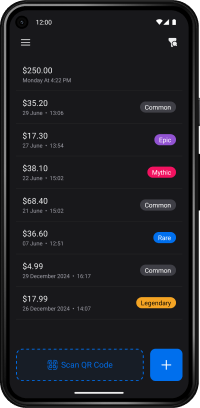
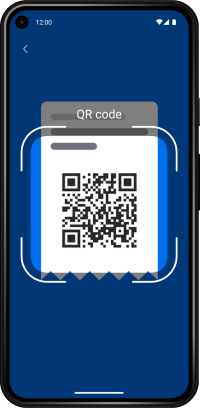
Receipt Collector is a React Native mobile app that helps you keep track of your shopping receipts. Instead of manually entering the amount and date, simply scan the receipt’s QR code.
-
📷 QR Code Scanning
Automatically extracts the amount and date from the receipt. -
🧠 Receipt Photo Import
Take a photo (or choose one from your gallery) and let AI extract amount/date before importing. -
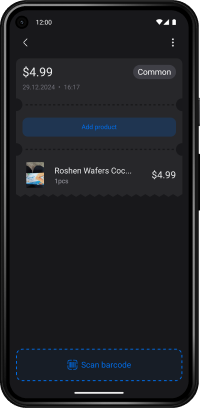
🛍️ Add Products
Add items to your receipt by scanning barcodes or entering them manually. -
📊 Statistics Dashboard
View statistics about your spending over the last week or month. -
🏷️ Receipt Rarity
Each receipt gets a random rarity: Common, Rare, Epic, Mythic, Legendary. This doesn’t affect functionality — it’s just a fun, gamified feature. -
✍️ Manual Entry
In case scanning is not possible, you can always enter data manually.
- Core: React Native, Expo, Expo Router
- State Management: MobX, react-native-mmkv
- UI & Styling: NativeWind, Merlo UI
- Camera & Scanning: react-native-vision-camera
- Animations: Reanimated
react-native-mmkv 3.x requires React Native New Architecture (TurboModules), so run the app with a development client, not Expo Go.
yarn android:rebuild
# or
yarn ios:rebuild
After the first rebuild, use:
yarn startReceipt photo import supports providers selected with:
EXPO_PUBLIC_RECEIPT_AI_PROVIDER=gemini # gemini | endpoint | localIf provider is gemini:
EXPO_PUBLIC_GEMINI_API_KEY=your-key
EXPO_PUBLIC_GEMINI_MODEL=gemini-3-flash-preview
# Optional if your account has it enabled:
# EXPO_PUBLIC_GEMINI_MODEL=gemini-3.1-flash-preview
If provider is endpoint:
EXPO_PUBLIC_RECEIPT_AI_ENDPOINT=https://your-api/receipt/extract
EXPO_PUBLIC_RECEIPT_AI_TOKEN=optional-token
Expected JSON response shape (top-level, data, or receipt):
{
  "amount": 42.5,
  "date": "2026-04-21T12:00:00.000Z",
  "confidence": 0.93,
  "rawText": "optional OCR text"
}
If amount or date are missing, the app tries to infer them from rawText/ocrText/text.
Important: EXPO_PUBLIC_* vars are bundled into the app and can be extracted from a client build. For production, prefer routing Gemini calls through your backend.